Why You Keep Losing Good Ideas in ChatGPT and How to Stop It

AI Productivity
Losing good ideas in ChatGPT is a workflow problem where useful insights stay trapped inside long AI conversations instead of becoming organized notes.

Gravy is an AI chat notebook for the perfect thinking workspace, allowing you to capture, organize and convert insights from AI conversations into structured and editable Smart Notes.

Why do good ideas get lost inside ChatGPT conversations?
Good ideas get lost inside ChatGPT conversations because chat is designed as a running dialogue, not as a durable knowledge system. Each new prompt pushes the earlier answer farther away. That is fine while you are thinking in the moment, but it becomes a problem when a useful insight is buried between rough questions, abandoned directions, and follow-up experiments.
The painful part is that the best idea is often not the final answer. It might be a positioning line from response five, a pricing angle from response nine, or a project checklist from the middle of a brainstorming session. If you keep going, that answer becomes part of the transcript instead of a note you can reuse.
This is why losing ideas in ChatGPT is usually not a memory problem. It is a capture problem. You noticed the idea, but you did not convert it into a stable object with a title, context, and a place to live. The chat kept moving, and the insight stayed behind.
What broken habits make ChatGPT ideas harder to find later?
The habits that make ChatGPT ideas harder to find later are usually workarounds people create because the normal workflow has too much friction. You scroll back through long threads, copy and paste walls of text, ask ChatGPT to summarize what it already said, or take screenshots of useful answers. Each habit solves the immediate anxiety of “I do not want to lose this,” but creates a retrieval problem later.
| Habit | Why people do it | Why it breaks later |
|---|---|---|
| Scrolling | Find an old answer | Slow in long threads |
| Copy-paste | Move text to notes | Loses context |
| Ask again | Recover the idea | May change details |
| Screenshot | Capture fast | Hard to edit or search |
The deeper issue is that these habits treat capture as an emergency step. You wait until the idea is almost lost, then try to rescue it. A better workflow captures the insight when it first becomes useful. That way, you are not relying on memory, scrolling, or image search to recover something that should have become a note immediately.
How do you know when a ChatGPT idea is worth saving?
A ChatGPT idea is worth saving when it has future utility outside the current conversation. That sounds simple, but it is the filter most people skip. They either save nothing because saving feels annoying, or they save too much because every response feels useful while the conversation is fresh.
- Save ideas that change what you plan to do next.
- Save ideas that could become a checklist, outline, decision, framework, or draft.
- Save ideas that explain something in language you would reuse.
- Save ideas that connect scattered thoughts into a clear structure.
- Skip ideas that are generic, obvious, repetitive, or only useful for one prompt.
I use one practical question: “Will I search for this again?” If the answer is yes, save it. Then title it based on the future search. “Onboarding friction ideas” is stronger than “ChatGPT thought.” “Customer pain point summary” is stronger than “AI brainstorm.” The title should describe why the idea matters, not where it came from. This is how a saved AI idea becomes a working asset instead of another forgotten note.
What system stops you from losing ChatGPT ideas again?
The system that stops you from losing ChatGPT ideas again is a selective capture workflow. It should be fast enough to use during the conversation and structured enough to make the idea useful later. If the system requires ten manual steps, you will avoid it. If it saves everything without structure, it becomes another messy archive.
- Capture the idea while the conversation is still active.
- Save the smallest useful section, not the whole response.
- Give it a title based on the future use.
- Add one sentence explaining why it matters.
- Place it under the project, decision, or workflow where it belongs.
This workflow works because it respects how AI thinking actually happens. You do not always know the final answer before you start. You think out loud, redirect, ask follow-ups, and discover useful fragments along the way. The system should let you preserve those fragments without forcing you to stop and rebuild a note from scratch in another app.
How does Gravy help you stop losing ideas from AI chat?
Gravy helps you stop losing ideas from AI chat by making the capture step part of the thinking session. Instead of using ChatGPT in one place and then manually moving good answers into Apple Notes, Notion, Google Docs, or screenshots, Gravy puts AI chat and structured notes side by side.
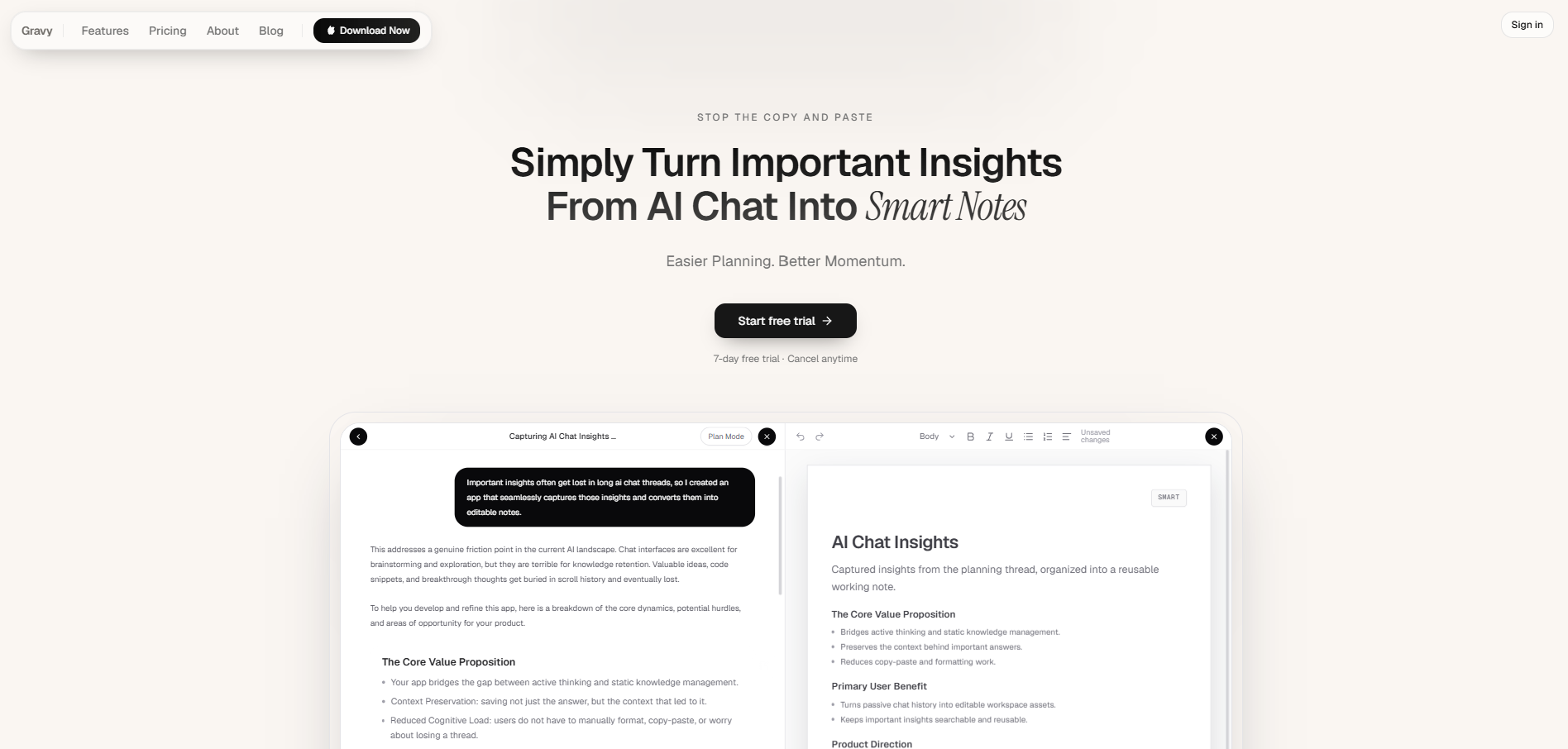
The workflow is simple. You use Gravy Chat normally to search, learn, brainstorm, plan, or think through a problem. When the AI gives you a useful answer, Gravy separates the response into Smart Blocks. That lets you choose the exact section worth saving instead of grabbing a giant response. With one click, that block becomes an editable Smart Note.
This matters because the best AI ideas are fragile. They feel obvious while you are in the conversation, then disappear once the thread gets longer. Gravy turns those ideas into organized notes before they become lost in scrolling, copy-paste cleanup, repeated summaries, or camera roll screenshots. The result is not just saved text. It is a reusable notebook built from the useful parts of your AI thinking.
How to stop losing good ideas in ChatGPT
- Notice the idea while it is freshWhen a response gives you a useful framework, plan, explanation, phrase, or decision, treat that as a capture moment instead of assuming you will find it later.
- Save only the useful sectionDo not copy the whole answer by default. Save the smallest section that could help with a future task, decision, project, or draft.
- Title the idea by future search intentUse the title you would type later, such as “pricing objection framework,” “launch week checklist,” or “customer avatar notes.”
- Add one sentence of contextWrite why the idea mattered, where it came from, or which project it supports. This keeps the saved idea meaningful after the conversation fades.
- Review saved AI ideas weeklyDelete weak captures, merge duplicates, and move strong ideas into active plans, content calendars, roadmaps, or decision documents.
How Gravy fits
Gravy is built for the exact moment when a good AI idea appears and you do not want it buried in the thread. You can chat normally, save the useful Smart Block as an editable Smart Note, and keep the insight organized without leaving the conversation. That turns ChatGPT-style thinking into a reusable notebook instead of a long transcript you have to search later.
FAQ
Why do I keep losing good ideas in ChatGPT?
You keep losing good ideas because ChatGPT stores conversations chronologically, while useful ideas need to be organized by project, decision, or future use. If you do not capture the idea as a note, it gets buried in the thread.
How can I find ideas I had in old ChatGPT chats?
Use search terms tied to the idea, project, or output, such as pricing, launch, checklist, customer, or roadmap. Going forward, save useful answers as notes with clear titles so you do not have to rely on thread search.
Is screenshotting ChatGPT a good way to save ideas?
Screenshotting is fast, but it is weak long term because screenshots are harder to search, edit, reorganize, or turn into action. It is better to save the actual text as an organized note.
What should I save from a ChatGPT brainstorm?
Save the ideas that could become decisions, plans, frameworks, content, product changes, or next steps. Skip generic answers and anything you cannot imagine searching for again.
How does Gravy help with lost AI ideas?
Gravy lets you save useful sections of AI responses as Smart Notes while you are still in the conversation. That keeps important ideas from disappearing inside long chat threads.