Best Way to Save Important ChatGPT Answers Without Copy-Paste Chaos

AI Productivity
The best way to save important ChatGPT answers is a selective capture system that turns useful AI responses into organized, searchable notes.

Gravy is an AI chat notebook for the perfect thinking workspace, allowing you to capture, organize and convert insights from AI conversations into structured and editable Smart Notes.

What is the best way to save important ChatGPT answers?
The best way to save important ChatGPT answers is to capture the specific reusable answer, give it a searchable title, add context, and store it in a dedicated note system. The mistake is saving the whole conversation by default. A full chat transcript preserves everything, but most of it will not matter later. Important answers need to be separated from the surrounding exploration.
I think of ChatGPT as a thinking room, not a filing cabinet. The conversation is where you ask messy questions, change direction, test ideas, and refine thoughts. The saved note is where the valuable result should live. That result might be a launch checklist, a customer avatar, a decision framework, a script, a product idea, or a concise explanation you want to reuse.
A good saving system has three jobs: reduce friction while you are thinking, preserve enough context to make the answer useful later, and make retrieval obvious. If your saved ChatGPT answer cannot be found, edited, or used in a real project, it is not truly saved.
How do you know which ChatGPT answers are important enough to save?
A ChatGPT answer is important enough to save when it can help your future self make a decision, complete a task, explain an idea, or avoid repeating the same thinking session. The key test is not whether the answer sounds good in the moment. The key test is whether you would search for it again.
- Save answers that produce a concrete output, such as a plan, outline, checklist, or framework.
- Save answers that clarify a decision, such as tradeoffs, assumptions, risks, or next steps.
- Save answers that capture language you may reuse, such as positioning, messaging, scripts, or summaries.
- Save answers that connect scattered thoughts into one useful structure.
- Skip answers that are generic, repetitive, or only useful for the current prompt.
This filter matters because oversaving creates a second problem: note clutter. If you save every response, your note system becomes another long chat history. The better move is to save answers with future utility. For example, “three pricing models with pros and cons” is worth saving. A generic paragraph explaining what pricing is probably is not. The goal is not hoarding AI output. The goal is preserving useful thinking.
Why is copying and pasting ChatGPT answers into notes not enough?
Copying and pasting ChatGPT answers into notes is better than losing them, but it is not a complete system. The main weakness is that copy-paste captures text without automatically preserving the reason it mattered. You may paste a strong answer into Apple Notes, Notion, Google Docs, or a document, then later open it and wonder which project it belonged to.
Copy-paste also breaks the flow of the conversation. You have to stop reading, highlight the right part, switch apps, create or find a note, paste the text, fix formatting, maybe add a title, then return to ChatGPT and regain your train of thought. That may sound small, but it becomes expensive during brainstorming, research, planning, or decision-making.
The better manual workflow is to paste less and annotate more. Save only the answer section that has reuse value. Put one sentence above it explaining the project, decision, or task. Then title the note based on what you would search later, such as “launch week email sequence” instead of “ChatGPT answer.”
Should you export full ChatGPT conversations or save individual answers?
You should export full ChatGPT conversations when you need a backup, but save individual answers when you need a working knowledge system. These are different use cases. Exporting is useful for preserving account data or keeping a record of old conversations. It is not ideal for daily thinking, because exported threads still require you to dig through large amounts of text.
Saving individual answers is more useful when the goal is reuse. If ChatGPT gives you a strong decision matrix, save the matrix. If it gives you a clear explanation, save the explanation. If it gives you ten brainstorming ideas and only two are useful, save the two. The value is in separating signal from transcript.
I would use both systems, but for different reasons. Exports are your archive. Notes are your active memory. The archive answers “where did this conversation happen?” The note answers “what useful thing came out of it?” For most people using ChatGPT to plan, learn, research, or brainstorm, the second question is the one that matters day to day.
How does Gravy make important ChatGPT answers easier to save?
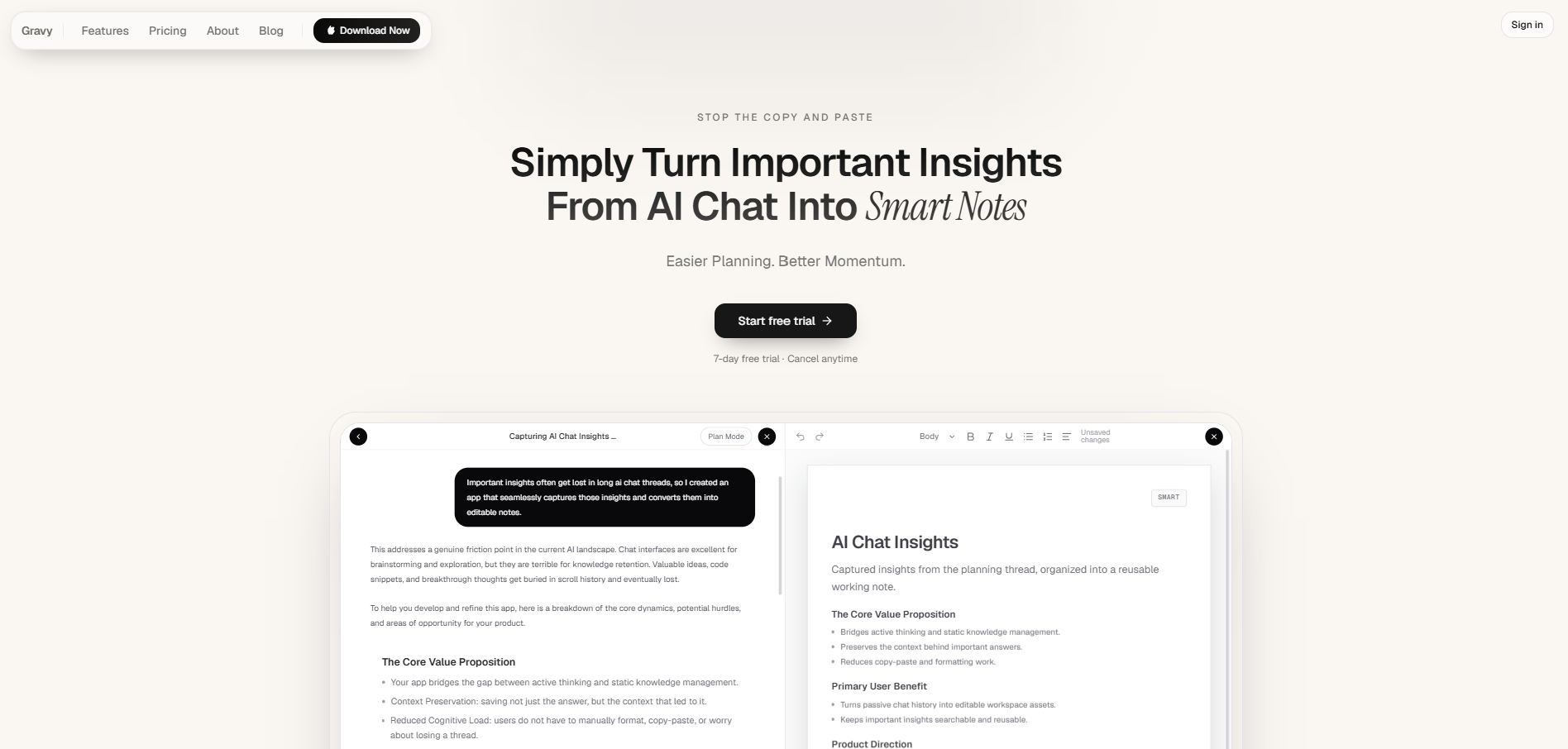
Gravy makes important ChatGPT answers easier to save by moving the capture workflow into the same place where the AI conversation happens. Instead of chatting in one app and organizing in another, Gravy combines an AI assistant with a structured note system. That matters because useful AI answers usually appear while you are still thinking, not after you have neatly finished the session.
The workflow is built around three pieces. You use Gravy Chat the way you would normally use an AI assistant: ask questions, brainstorm, plan, research, and refine. The response is divided into Smart Blocks, which makes it easier to choose the exact section worth keeping. Then you can save that Smart Block as an editable Smart Note without leaving the conversation.
That changes the job from “copy this giant answer somewhere else” to “capture this useful insight while it is still fresh.” Over time, your AI conversations stop being long walls of text and start becoming a working notebook of plans, frameworks, decisions, and ideas you can return to.
How to save important ChatGPT answers
- Decide whether the answer has future valueAsk whether the answer will help with a future decision, project, draft, plan, or explanation. If it only helped you move through the current prompt, leave it in the chat.
- Save the smallest useful sectionDo not save the entire response unless every part matters. Capture the framework, checklist, paragraph, table, or recommendation that you would actually reuse.
- Add a title your future self would searchUse a clear title based on the saved answer’s job. For example, “customer avatar for productivity app” is stronger than “ChatGPT response.”
- Attach one sentence of contextWrite why the answer mattered, which project it belongs to, or what decision it supports. This protects the meaning of the saved answer after the original chat fades from memory.
- Review saved answers regularlyOnce a week, clean up saved AI answers. Merge duplicates, delete weak notes, and move useful answers into the project, plan, or content workflow where they belong.
How Gravy fits
Gravy is designed for people who get valuable answers from AI and do not want those answers buried in chat history. You can chat normally, choose the useful Smart Block, and turn it into an editable Smart Note without copy-pasting into a separate app. That makes saving important ChatGPT answers feel like part of the thinking process, not a cleanup task afterward.
FAQ
What is the best app to save important ChatGPT answers?
The best app is the one that lets you save only the useful answer, add context, organize it by project, and find it later. Traditional note apps can work, but an AI chat notebook like Gravy is built specifically for capturing insights from AI conversations.
Is it better to save a full ChatGPT chat or one answer?
Save the full chat when you need complete context or an archive. Save one answer when you need a reusable plan, framework, checklist, explanation, or decision summary. For daily productivity, individual saved answers are usually easier to use.
How do I save ChatGPT answers without losing context?
Save the answer with a clear title and one sentence explaining the project, question, or decision it relates to. Without that context, the pasted answer may be technically saved but hard to understand later.
Why do my saved ChatGPT answers become messy?
Saved ChatGPT answers become messy when you save too much, use vague titles, skip context, and scatter notes across too many apps. A better system saves fewer, stronger answers and organizes them around projects or decisions.
Can Gravy save only the useful part of an AI response?
Yes. Gravy is built around Smart Blocks, so you can save a useful section of an AI response as a Smart Note instead of copying the entire answer or taking screenshots of the chat.