How to Bookmark a ChatGPT Response Without Losing the Useful Part Later
ChatGPT Workflows
Bookmarking a ChatGPT response is a capture workflow that saves one useful AI answer with enough context to find, edit, and reuse later.

Gravy is an AI chat notebook for the perfect thinking workspace, allowing you to capture, organize and convert insights from AI conversations into structured and editable Smart Notes.

Can you bookmark a specific ChatGPT response?
You can preserve a specific ChatGPT response, but the right method depends on what you mean by “bookmark.” If you mean saving the whole conversation, you can rely on chat history, rename the chat, place it inside a Project, or create a shared link. If you mean saving one useful answer inside a long thread, a conversation-level bookmark is usually not enough.
That difference matters because a ChatGPT thread can contain dozens of prompts and responses. The answer you want may be a middle section: a framework, a table, a checklist, a pricing idea, or a paragraph you want to reuse. Bookmarking the entire thread tells you where the conversation lives, but it does not necessarily take you back to the exact insight.
The better workflow is to treat the response itself as the thing worth saving. Capture the specific answer, give it a title based on future search intent, and keep enough context to understand why it mattered later.
Why is bookmarking the whole ChatGPT conversation not enough?
Bookmarking the whole ChatGPT conversation is not enough because most valuable AI work happens inside long, messy threads. A conversation might begin with a broad question, shift into examples, move into criticism, and eventually produce one excellent answer. A normal bookmark points to the container. It does not separate the signal from the surrounding exploration.
| Bookmark type | What it saves | What can still go wrong |
|---|---|---|
| Chat title | The thread | Useful answer stays buried |
| Project | Related chats | Insight still needs extraction |
| Shared link | Conversation access | Privacy and context concerns |
| Saved note | Specific response | Requires a capture habit |
The problem becomes obvious later. You remember that ChatGPT gave you “a great launch plan,” but the thread contains twenty more answers after it. You open the bookmark, then still have to scroll, skim, and reconstruct what mattered. That is not a true bookmark. It is a pointer to a pile. A real response bookmark should take the useful idea out of the pile and make it easy to reuse.
What should a useful ChatGPT response bookmark include?
A useful ChatGPT response bookmark should include the exact answer, the original context, a search-friendly title, and a next-use label. Without those pieces, you may save the response but still lose its meaning. This is especially true when you are brainstorming, planning, or researching, because the answer often depends on the question that came before it.
- Exact answer: the useful section, not the entire conversation.
- Original context: the question, project, or decision that led to the answer.
- Search title: the words your future self would type later.
- Next-use label: plan, draft, checklist, framework, decision, research, or reference.
- Source pointer: a link or note showing where the response came from.
I recommend writing the title after the useful answer appears, not before. The first prompt may be vague, but the final value may be specific. For example, “customer onboarding objections” is a stronger bookmark title than “ChatGPT marketing chat.” The title should describe the job the saved response will do later.
What is the best manual way to bookmark a ChatGPT answer?
The best manual way to bookmark a ChatGPT answer is to create a focused note from the useful section while the conversation is still fresh. Do not wait until the end of a long session. If you wait, you are relying on memory to decide which answer mattered, where it was, and what you planned to do with it.
- Copy only the useful part of the ChatGPT response.
- Paste it into one dedicated note system, not a random temporary document.
- Give the note a title based on the future use case.
- Add one sentence explaining the original question or project.
- Add a label such as draft, plan, decision, checklist, framework, or research.
This workflow is stronger than taking a screenshot because the text stays editable and searchable. It is stronger than bookmarking the browser page because the saved object is the answer, not the thread. The weakness is friction. Copying, switching apps, pasting, formatting, and returning to the chat can interrupt the exact thinking flow that produced the useful answer.
How does Gravy make bookmarking AI responses easier?
Gravy makes bookmarking AI responses easier by turning the useful part of the conversation into a note without forcing you to leave the chat. That matters because the moment you notice a strong answer is usually the same moment you want to keep thinking. A normal workflow asks you to stop, copy, paste, organize, and return. Gravy makes capture part of the AI workspace.
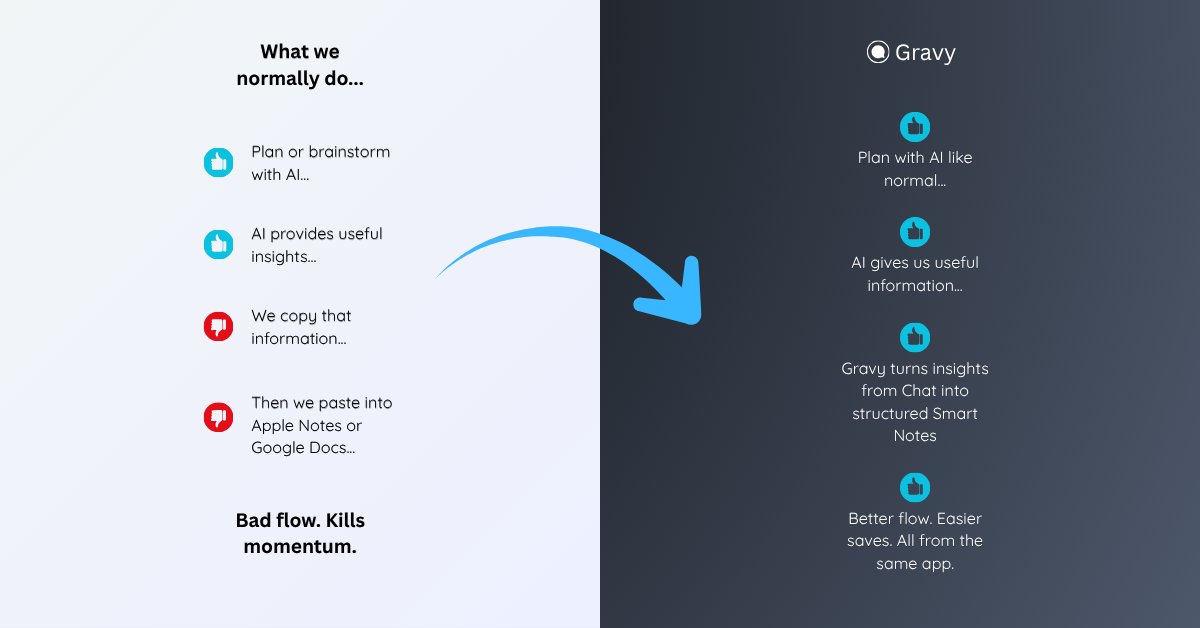
The workflow is built around Smart Blocks and Smart Notes. You use Gravy Chat normally to ask questions, brainstorm, research, plan, or make decisions. When the AI response contains a useful section, Gravy separates that response into Smart Blocks. You choose the block worth keeping and save it as an editable Smart Note.
That is closer to a true response bookmark. You are not just marking the thread for later. You are saving the exact insight in a structured, reusable format. The conversation remains useful as source context, but the answer gets its own place in your notebook.
How to bookmark a ChatGPT response
- Decide whether the response is worth savingAsk whether the answer will help with a future decision, draft, plan, checklist, framework, research note, or explanation. If it will not be reused, leave it in the chat.
- Save the smallest useful sectionAvoid saving the entire conversation by default. Capture the exact response section that contains the reusable value.
- Create a future-facing titleTitle the bookmark based on what you would search later, such as “launch risk checklist” or “customer avatar objections.”
- Add context and sourceWrite one sentence explaining the original question, project, or decision. Add a source pointer if you need to return to the broader conversation later.
- Review saved response bookmarksOnce a week, clean up saved responses, merge duplicates, and move the best ones into active projects, plans, drafts, or decision documents.
How Gravy fits
Gravy fits this workflow because bookmarking an AI response should mean saving the useful insight, not just marking a long thread. With Gravy, you can chat normally, choose the useful Smart Block, and save it as an editable Smart Note while the idea is still fresh. That gives you a cleaner way to revisit and reuse the exact answer that mattered.
FAQ
Can I bookmark a single ChatGPT response?
You can save a single response manually by copying the useful section into a note with a title and context. Conversation-level tools like chat history, Projects, and shared links help you find threads, but they may not isolate one exact response.
Is a ChatGPT shared link the same as bookmarking a response?
No. A shared link points to a conversation. That can be useful for sharing or revisiting a thread, but it does not automatically turn one answer into an organized, editable note.
What is the best way to save one ChatGPT answer?
Save the smallest useful section, give it a clear title, add one sentence of context, and store it in a consistent note system. This is better than saving the whole conversation when you only need one answer.
Should I screenshot a ChatGPT response I want to bookmark?
Screenshots are fast, but they are weak long term because the text is harder to search, edit, reorganize, or reuse. Editable notes are usually better for important responses.
How does Gravy help bookmark AI responses?
Gravy lets you save useful Smart Blocks from AI responses as editable Smart Notes. That gives the important answer its own organized place instead of leaving it buried inside a long chat thread.