How to Find Old ChatGPT Conversations Without Scrolling Forever

ChatGPT Workflows
Finding old ChatGPT conversations is a retrieval workflow that combines search, better chat titles, project organization, and saved AI notes.

Gravy is an AI chat notebook for the perfect thinking workspace, allowing you to capture, organize and convert insights from AI conversations into structured and editable Smart Notes.

How do you find old ChatGPT conversations in your history?
You find old ChatGPT conversations by opening your chat history, using search when available, and typing keywords or phrases you remember from the conversation. The best search terms are usually not broad topics like “business” or “marketing.” They are specific words tied to the useful output, such as “pricing objections,” “launch checklist,” “customer avatar,” “meal plan,” “roadmap,” or a phrase you remember the AI used.
The fastest workflow is to search from the most specific clue to the broadest clue. Start with a unique phrase. If that fails, search the project name. If that fails, search the type of output, such as checklist, script, table, framework, or summary. Then scan the conversation titles and open the ones most likely to contain the answer.
The real issue is that ChatGPT history can tell you where a conversation is, but it does not always surface the exact insight you wanted. Finding the thread is only step one. You still may need to scroll through a long conversation to locate the useful answer.
Why is it so hard to find one answer in an old ChatGPT thread?
It is hard to find one answer in an old ChatGPT thread because the conversation is stored as a timeline, while your memory usually works by meaning. You may remember that ChatGPT gave you “a really good business model breakdown,” but not the exact words it used. Search is strongest when you remember language. It is weaker when you only remember the idea.
Long chats also mix multiple jobs into one thread. A conversation might begin with customer research, shift into product features, explore pricing, and end with a content plan. Later, when you search for the pricing section, you are really searching inside a messy thinking session. The useful answer exists, but it is surrounded by drafts, questions, alternatives, and dead ends.
That mismatch is why people often resort to scrolling manually or asking ChatGPT to repeat itself. They are not just looking for an old chat. They are trying to recover a specific piece of thinking that was never saved as its own object.
| What you remember | Why search struggles | Better clue |
|---|---|---|
| A good idea | Too vague | Project name |
| The topic | Too broad | Output type |
| The vibe | Not searchable | Exact phrase |
| The date | Too many chats | Decision made |
What search terms work best for finding old ChatGPT conversations?
The search terms that work best for finding old ChatGPT conversations are specific, outcome-based, and tied to the language of the answer. I recommend searching in layers. First, search for unique nouns from the project, such as the product name, client name, niche, feature, or campaign. Second, search for the artifact ChatGPT created, such as checklist, outline, script, plan, matrix, roadmap, summary, or table.
- Project terms: app name, campaign name, client, niche, feature, or goal.
- Output terms: checklist, framework, table, outline, plan, script, or roadmap.
- Decision terms: pricing, launch, positioning, offer, audience, risk, or tradeoff.
- Memory terms: any unusual phrase, example, analogy, or wording you remember.
- Date terms: only use dates after stronger meaning-based searches fail.
The weak search pattern is typing the same broad topic every time. For example, “marketing” may return too much. “TikTok launch hooks” is better. “TikTok launch hooks for waitlist page” is even better. The goal is to recreate the future-use label the conversation should have had in the first place.
How can you organize ChatGPT conversations so old answers are easier to find?
You can organize ChatGPT conversations so old answers are easier to find by naming chats around the useful outcome, grouping related work, and extracting important answers into notes. A chat title like “business ideas” is too broad. A title like “pricing model for AI notes app” tells your future self what the conversation produced and why it matters.
For ongoing work, group conversations by project or objective instead of leaving everything in a single chronological sidebar. If your AI work involves a product launch, keep research, positioning, pricing, content, and decision-making in the same project area. This reduces the search area before you even type a keyword.
The deeper fix is to stop making the chat thread carry all the responsibility. When a conversation produces a strong answer, turn that answer into a note with a clear title and one sentence of context. Then the next time you need it, you can search the saved note instead of reopening a long thread and scanning for the right paragraph.
How does Gravy help you find old AI ideas without digging through chats?
Gravy helps you find old AI ideas by changing what gets saved in the first place. Instead of relying on a long chat thread as the only record, Gravy lets useful parts of the conversation become structured notes while the idea is still fresh. That means the important answer has its own title, shape, and place to live before the thread becomes hard to search.
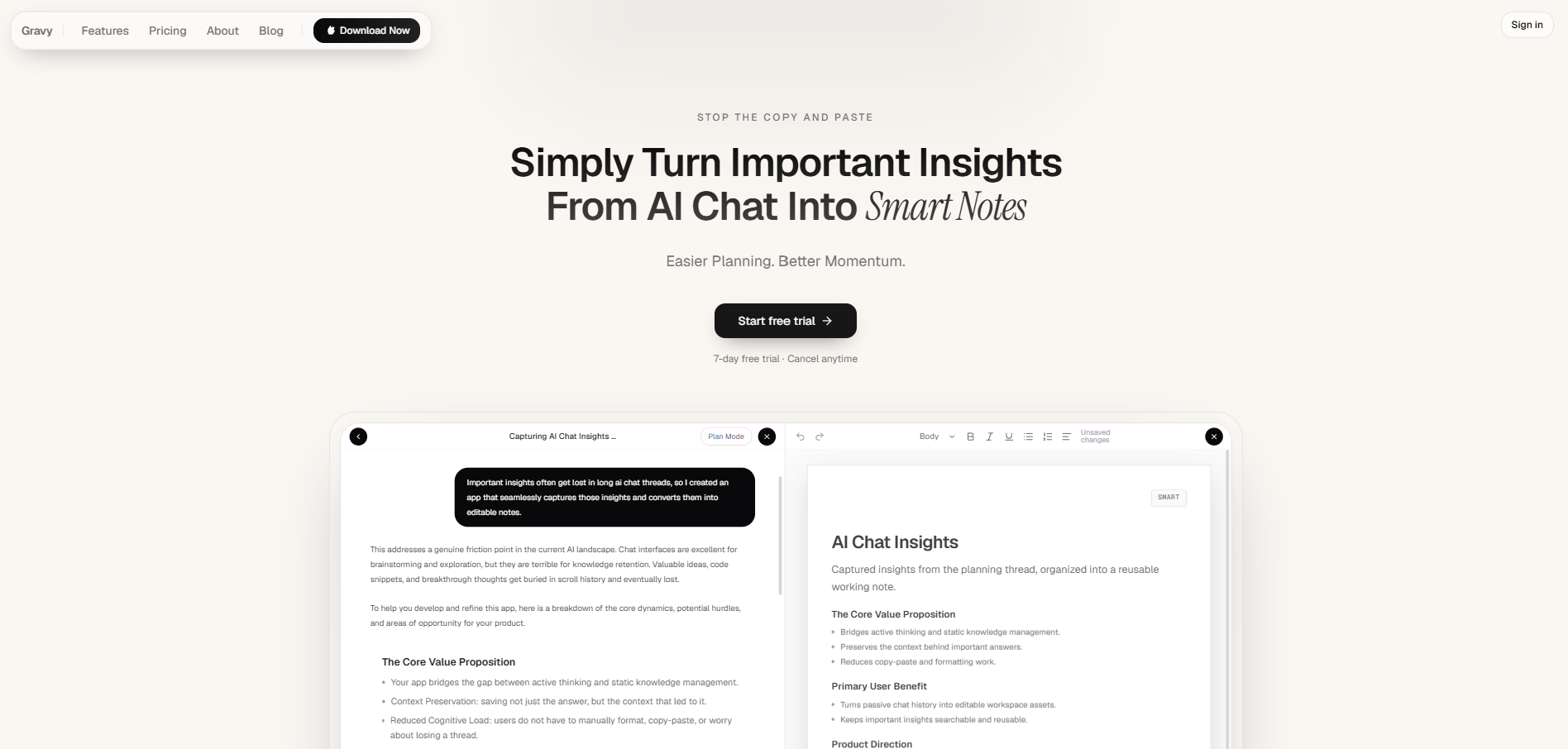
The workflow starts with Gravy Chat, where you ask questions, brainstorm, plan, research, or think through a decision like you normally would. When the AI gives you a useful response, Gravy separates the answer into Smart Blocks. You can choose the section that matters, then save it as an editable Smart Note without switching apps.
This matters because finding old ChatGPT conversations is usually a rescue mission. You are trying to recover something that should have been captured earlier. Gravy turns that into a prevention workflow. The useful idea becomes a note when it appears, so later you are searching your organized notebook, not excavating a massive conversation.
How to find old ChatGPT conversations
- Search for a unique phrase firstUse the most specific phrase, example, product name, or unusual wording you remember. Exact language is usually more effective than broad topics.
- Search by output typeTry words like checklist, framework, table, script, roadmap, outline, plan, summary, or matrix. These terms match the useful asset you were trying to recover.
- Search by project or decisionUse the project name, feature, audience, offer, launch, pricing, risk, or decision that the conversation supported.
- Rename the recovered conversationOnce you find the right thread, rename it based on the useful outcome so it is easier to find next time.
- Extract the important answer into a noteDo not leave the answer buried again. Save the useful section as a note with a clear title, context sentence, and project label.
How Gravy fits
Gravy fits this workflow because the best way to find old AI ideas is to save them correctly when they first appear. You can chat normally, save useful Smart Blocks as editable Smart Notes, and search your organized notebook later instead of scrolling through long conversations.
FAQ
How do I search my old ChatGPT conversations?
Open your ChatGPT history and use search with specific keywords or phrases you remember. Start with unique project names, exact phrases, output types, or decision terms before trying broad topics.
Why can’t I find an old ChatGPT conversation?
You may be searching with words that were not used in the conversation, or the chat title may be too vague. Try searching by project name, output type, decision, or any unusual phrase you remember from the answer.
Can ChatGPT remember old conversations for me?
ChatGPT may reference past information depending on your settings and plan, but that is different from a reliable personal note system. Important answers should still be saved as organized notes if you need to reuse them.
Should I rename old ChatGPT conversations after finding them?
Yes. Rename the conversation based on the useful output, such as “launch checklist” or “pricing decision framework.” This makes the thread easier to identify later.
How can Gravy help me find AI ideas later?
Gravy helps by turning useful sections of AI responses into Smart Notes. Instead of searching through a long chat thread later, you can find the saved insight in an organized note system.