How to Save Claude Conversations Without Losing Useful AI Insights
AI Productivity
Saving Claude conversations is a workflow for preserving useful AI answers, exporting chat history, and turning important responses into reusable notes.

Gravy is an AI chat notebook for the perfect thinking workspace, allowing you to capture, organize and convert insights from AI conversations into structured and editable Smart Notes.

How do you save Claude conversations from your account?
You can save Claude conversations in two different ways: export your Claude data for backup, or manually capture useful answers into a note system. Those two workflows solve different problems. Exporting is best when you want a copy of your account information and chat history. Manual or structured note capture is better when you want to reuse one important answer from a conversation.
Anthropic’s current export path for individual Claude users is through the web app or Claude Desktop. The flow is to click your initials, open Settings, go to Privacy, and choose Export data. Anthropic says exports cannot be started from the iOS or Android apps, which matters if most of your Claude usage happens on mobile.
I would treat this export as a safety net, not your main productivity system. It helps answer, “Can I get my Claude history?” It does not automatically answer, “Can I quickly find the customer research summary, decision framework, or draft I want to reuse?”
What is the difference between exporting Claude chats and saving useful Claude answers?
Exporting Claude chats preserves the conversation record. Saving useful Claude answers preserves the actual knowledge you want to use later. That distinction is important because a full conversation can include brainstorming, clarifying questions, rejected directions, duplicate explanations, and one excellent section buried in the middle. The export keeps all of it. A good note system extracts the valuable part.
| Workflow | Best for | Main limitation |
|---|---|---|
| Claude data export | Backup and records | Still contains long transcripts |
| Copy-paste to notes | Quick manual capture | Loses context unless you add it |
| Screenshots | Fast visual saving | Hard to search or edit |
| Structured notes | Reusable insights | Needs a capture habit |
The practical rule is this: export for archive, save answers for action. If Claude gives you a market research summary, a product strategy, a legal-risk checklist, or a writing draft, do not rely on the full transcript as the only place that answer lives. Save the useful section separately with a clear title and one sentence explaining why it matters.
Why do useful Claude responses get lost in long conversations?
Useful Claude responses get lost because AI conversations are built around flow, not filing. You ask a question, Claude answers, you refine, it improves the answer, you redirect, and the thread keeps expanding. That is exactly what makes Claude valuable for thinking, but it also means important ideas can sink inside a long transcript.
This is especially common when you use Claude for writing, research, coding, planning, strategy, or analysis. The useful output might be a middle response: a better outline, a sharper argument, a useful table, a risk summary, or a clean explanation. If you keep prompting, that answer becomes harder to locate later. You may remember that Claude produced something helpful, but not the exact wording needed to search for it.
The hidden problem is context decay. An answer that felt obvious during the conversation can feel disconnected later if you copy it without the original question or project. A saved Claude response needs a title, context, and purpose, not just pasted text.
What is the best manual system for saving Claude answers to notes?
The best manual system for saving Claude answers is a selective capture template. Do not paste the entire answer unless every section is useful. Instead, copy the smallest section that has future value, then wrap it in a note structure that makes it easy to understand later.
- Title the note by future search intent, not the date of the conversation.
- Save the useful Claude response section, not the whole transcript.
- Add one sentence explaining the original question or project.
- Label the note as a draft, plan, checklist, framework, decision, research, or reference.
- Store it under the project, goal, or workflow where you will use it again.
This system works because it turns Claude output into working knowledge. For example, instead of saving a full chat called “Claude research,” create a note called “competitor positioning risks for landing page.” That title tells your future self what the answer does. The context sentence tells you why you trusted it. The label tells you how to use it next.
How does Gravy help save Claude-style AI conversations as notes?
Gravy helps save Claude-style AI conversations by focusing on the real problem: the useful answer appears while you are still thinking. In a normal workflow, you chat with an AI assistant, notice a strong response, then leave the conversation to copy it into Apple Notes, Notion, Google Docs, or screenshots. That creates friction right when the idea is fresh.
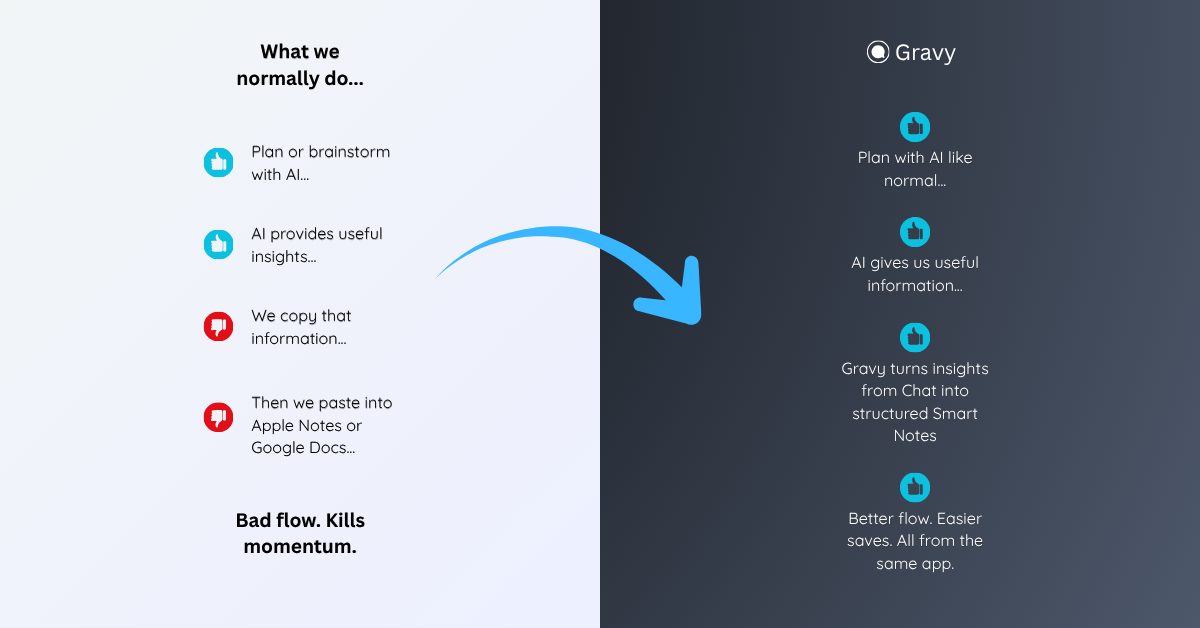
Gravy puts the AI chat and note system in one workspace. You can use Gravy Chat to brainstorm, plan, research, outline, compare, and refine ideas. When a response contains something worth keeping, it is separated into Smart Blocks. Instead of saving the entire response, you choose the useful block and turn it into an editable Smart Note.
That workflow is useful even if you also use Claude. The point is not just which AI model generated the answer. The point is whether the insight gets captured in a structured, reusable place. Gravy turns AI chat from a temporary transcript into a notebook of useful decisions, plans, drafts, and ideas.
How to save Claude conversations
- Export Claude data for backupUse Claude on the web or Claude Desktop, open Settings, go to Privacy, and choose Export data. Store the export in a secure dated folder as an archive.
- Do not treat the export as your note systemUse the export as a record of your conversations. For daily work, extract only the answers that can become useful plans, drafts, checklists, frameworks, or decisions.
- Capture the smallest useful answerWhen Claude gives a useful response, save the exact section that matters instead of copying the whole conversation or taking a screenshot.
- Add a title and context sentenceUse a title your future self would search for and add one sentence explaining the original question, project, or decision.
- Organize saved Claude answers by useGroup saved answers under projects, decisions, workflows, or reference topics so they can be reused without reopening the original conversation.
How Gravy fits
Gravy fits this workflow because saving AI conversations should not depend on exports, screenshots, or manual copy-paste. You can chat normally, save useful Smart Blocks as editable Smart Notes, and keep important AI insights organized while the conversation is still fresh. That makes Gravy helpful for anyone who uses Claude, ChatGPT, Gemini, or other AI assistants for serious thinking.
FAQ
Can I export my Claude conversations?
Yes. Anthropic says individual Claude users can export user information and chat history from Settings and Privacy on the web app or Claude Desktop. Exports cannot be started from Claude for iOS or Android.
Is exporting Claude data the best way to save useful answers?
Exporting is best for backup and records. If you want to reuse a specific Claude answer, it is better to save that answer as a separate note with a clear title and context.
How do I save one useful Claude response?
Copy only the useful section, paste it into your note system, give it a search-friendly title, and add one sentence explaining the project, question, or decision it supports.
Should I screenshot Claude answers?
Screenshots are fast, but they are weak for long-term use because the text is harder to search, edit, reorganize, and reuse. Editable notes are usually better.
How can Gravy help with saving Claude conversations?
Gravy helps by turning useful AI response sections into Smart Notes inside the same workspace, so important insights do not stay buried inside long conversations.