The Best Way to Keep ChatGPT Ideas Organized So You Can Use Them Later
AI Productivity
The best way to keep ChatGPT ideas organized is a capture workflow that turns useful AI thoughts into titled, searchable, reusable notes.

Gravy is an AI chat notebook for the perfect thinking workspace, allowing you to capture, organize and convert insights from AI conversations into structured and editable Smart Notes.

Why do ChatGPT ideas become disorganized so quickly?
ChatGPT ideas become disorganized quickly because AI conversations are built for momentum, not filing. You ask one question, get a useful response, add a constraint, change direction, test another angle, and suddenly one thread contains research, drafts, decisions, objections, examples, and half-finished thoughts. The conversation may be saved, but the ideas inside it are not organized by use.
The issue gets worse when you use ChatGPT for real thinking instead of one-off answers. A single planning session can produce a launch idea, pricing concern, content hook, customer insight, and technical question. If all of those stay in one transcript, you will eventually have to scroll and reconstruct what each idea was for.
That is why organization has to happen at the idea level, not just the chat level. A saved conversation is a record. An organized idea is a reusable asset with a title, context, category, and next step.
What is the best way to organize ChatGPT ideas?
The best way to organize ChatGPT ideas is to separate raw brainstorming from reusable notes. Raw brainstorming can stay messy because that is where exploration happens. Organized notes should be selective, titled, and connected to a future use. If you try to make every chat clean, you will slow down your thinking. If you never extract the useful ideas, you will lose them.
| Layer | Purpose | Example |
|---|---|---|
| Raw chat | Explore and test ideas | Brainstorm launch angles |
| Saved idea | Preserve one useful insight | Referral loop concept |
| Project note | Connect ideas to work | Launch plan |
| Decision note | Record reasoning | Pricing choice |
A practical system has five fields: idea title, original context, category, project, and next action. The title makes the idea searchable. The context explains why it mattered. The category tells you whether it is a draft, plan, research note, feature, or decision. The project shows where it belongs. The next action stops the idea from becoming passive clutter.
How should you name and label saved ChatGPT ideas?
Name and label saved ChatGPT ideas based on how you expect to find them later. Weak titles describe where the idea came from: “ChatGPT idea,” “AI notes,” or “brainstorm.” Strong titles describe what the idea helps you do: “waitlist landing page objections,” “subscription pricing tradeoffs,” or “TikTok launch hooks for students.”
- Use project names when the idea belongs to a specific product, client, campaign, or goal.
- Use output labels such as checklist, framework, draft, plan, research, decision, or reference.
- Use topic tags such as pricing, onboarding, retention, content, launch, audience, or positioning.
- Use action labels such as review, test, publish, build, rewrite, validate, or archive.
- Avoid vague labels that only make sense while the conversation is fresh.
A good naming system makes future search easier because it matches the words you would naturally type when you need the idea again. The title should not describe the chat. It should describe the job the saved idea will do. That one change makes the difference between a note archive and a working knowledge system.
What should your ChatGPT idea system look like in practice?
Your ChatGPT idea system should be simple enough to use during a live AI session and structured enough to survive later search. The mistake is building an elaborate database that you avoid using, or keeping no system at all and relying on memory. A practical system should let you capture an idea in under a minute.
- Save the smallest complete idea that has future value.
- Give it a title based on the future use, not the original prompt.
- Add one context sentence explaining the project or decision.
- Label the idea by type, such as plan, draft, framework, research, or decision.
- Assign a next action, even if the action is review later.
This system also gives you a review rhythm. Once a week, scan saved AI ideas and decide what to delete, combine, promote, or act on. Some ideas become projects. Some become drafts. Some become decisions. Some become irrelevant. Organization is not only where you put ideas. It is how you keep the useful ones moving.
How does Gravy keep ChatGPT ideas organized inside the AI workflow?
Gravy keeps ChatGPT-style ideas organized inside the AI workflow by removing the gap between thinking and saving. In a normal workflow, you brainstorm in one place and organize ideas somewhere else. That means the capture step depends on copy-paste, screenshots, memory, or cleaning up long transcripts after the session. Gravy brings the notebook into the chat.
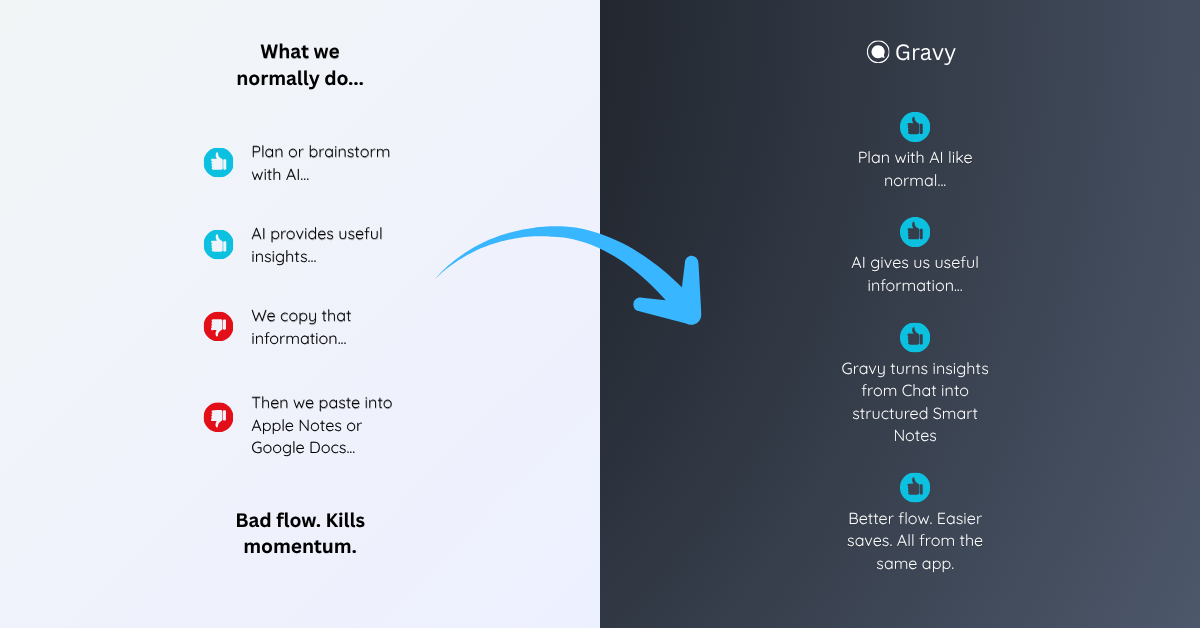
You use Gravy Chat normally to brainstorm, plan, research, learn, compare options, or think through decisions. When the AI gives a useful response, Gravy separates it into Smart Blocks. Instead of saving the whole answer, you choose the block that matters and turn it into an editable Smart Note.
That creates organization at the exact moment the idea appears. The conversation can keep moving, but the useful idea now has a dedicated note. Over time, your best AI thoughts become a searchable notebook of plans, drafts, decisions, frameworks, and insights instead of a sidebar full of buried chat threads.
How to keep ChatGPT ideas organized
- Let the chat stay messyUse ChatGPT freely for exploration, brainstorming, and refinement. Do not force the conversation itself to become your final note system.
- Extract only reusable ideasSave the ideas that can become decisions, drafts, frameworks, checklists, research notes, plans, or next steps.
- Use future-facing titlesTitle each saved idea with the phrase you would search later, such as “retention email sequence” or “pricing objection framework.”
- Add context and labelsWrite one sentence explaining why the idea matters, then label it by project, type, and next action.
- Review and clean up weeklyDelete weak captures, merge duplicates, promote strong ideas into active work, and archive ideas that no longer support a real goal.
How Gravy fits
Gravy fits this workflow because the best way to keep ChatGPT ideas organized is to save the useful part while the conversation is still active. You can chat normally, choose the Smart Block that matters, and save it as an editable Smart Note without dragging the whole thread into your notes. That turns AI brainstorming into an organized system you can actually reuse.
FAQ
What is the best way to keep ChatGPT ideas organized?
The best way is to save only reusable ideas, give each one a clear title, add context, label it by project or type, and assign a next action.
Should I organize ChatGPT ideas by chat or by project?
Organize reusable ideas by project, decision, or future use. The chat can remain as source material, but your saved ideas should live where you will use them.
What should I do with random ChatGPT ideas?
Save only the random ideas you might use later. Give each one a title, context sentence, and review date. Delete or archive ideas that do not connect to a real goal.
Why does my ChatGPT history feel disorganized?
Chat history is chronological, but your work is usually organized by project, topic, decision, or next action. That mismatch makes old ideas hard to retrieve.
How does Gravy help organize ChatGPT ideas?
Gravy lets you save useful sections of AI responses as Smart Notes while you are still chatting, so important ideas become organized instead of staying buried inside long conversations.