How to Keep Track of ChatGPT Ideas Before They Get Buried
AI Productivity
Keeping track of ChatGPT ideas is a capture workflow that turns useful AI brainstorms into organized notes you can find and reuse later.

Gravy is an AI chat notebook for the perfect thinking workspace, allowing you to capture, organize and convert insights from AI conversations into structured and editable Smart Notes.

Why is it hard to keep track of ChatGPT ideas?
It is hard to keep track of ChatGPT ideas because AI conversations move faster than traditional note systems. You ask a question, get an answer, refine it, challenge it, add a constraint, and suddenly the thread contains ten directions. The useful idea may be in the middle, not at the end. If you keep prompting, that idea gets buried under more exploration.
The problem is not that ChatGPT failed to save the conversation. The conversation usually still exists. The problem is that a conversation is not the same as an idea tracker. A thread stores everything in order. Your actual work needs ideas grouped by project, decision, content, feature, goal, or next step. That small shift changes the whole system.
I think of ChatGPT as a thinking space, not a final filing system. It is where ideas begin, collide, and improve. But once an idea becomes useful, it needs to leave the raw thread and become a stable note with a title, context, and purpose.
What kinds of ChatGPT ideas should you actually track?
You should track ChatGPT ideas that have future utility, not every interesting sentence. This distinction matters because AI can generate a lot of plausible output quickly. If you save everything, your idea tracker becomes another messy chat archive. If you save nothing, useful insights disappear.
- Track ideas that could become a project, offer, feature, article, video, plan, or decision.
- Track ideas that clarify a tradeoff, assumption, risk, customer pain point, or next step.
- Track ideas that include reusable language, such as hooks, positioning, scripts, or explanations.
- Track ideas that connect scattered thoughts into a framework or checklist.
- Skip ideas that are generic, repetitive, obvious, or only useful for the current prompt.
A simple filter is: “Would I search for this idea again?” If yes, track it. If no, let it stay in the thread. For example, “three launch angles for college students” is worth tracking. “try marketing on social media” probably is not. Good idea tracking is not about collecting more. It is about preserving the ideas that can turn into action.
What is the best system for tracking ChatGPT ideas?
The best system for tracking ChatGPT ideas has two layers: a raw thinking layer and a reusable ideas layer. The raw layer is the full conversation, where exploration can stay messy. The reusable layer is your note system, where only the ideas with future value get saved. Mixing those two layers is why people end up scrolling through long threads later. This keeps your system useful when one conversation produces several different ideas.
| Layer | Purpose | Example |
|---|---|---|
| Raw chat | Explore messy thoughts | Brainstorm app ideas |
| Idea note | Save reusable insight | Alarm app retention loop |
| Decision note | Preserve reasoning | Subscription pricing choice |
| Action note | Turn idea into work | Launch landing page tasks |
Each tracked idea should include four fields: title, context, category, and next action. The title should match what you would search later. The context should explain why the idea mattered. The category should show whether it is a feature, content idea, offer, decision, or research insight. The next action should say what happens next, even if that action is “review later.”
Why do screenshots and copy-paste fail as ChatGPT idea trackers?
Screenshots and copy-paste fail as ChatGPT idea trackers because they capture information without creating a reliable retrieval system. A screenshot may preserve the idea visually, but the text is harder to edit, search, reorganize, or turn into action. Copy-paste is better because the text stays editable, but it still fails if the pasted note has no title, context, or project connection. That separation keeps brainstorming flexible and retrieval practical.
The deeper issue is interruption. When you are in a strong ChatGPT brainstorming session, switching to another app can break momentum. You have to highlight the right text, open Apple Notes, Notion, Google Docs, or another tool, create a note, paste the answer, clean it up, and return to the thread. That is a lot of friction for one idea.
This is why people often tell themselves they will organize ideas later. But later, the thread is longer, the context is weaker, and the reason the idea mattered is less obvious. A good tracking system captures the idea while the meaning is still fresh.
How does Gravy help you keep track of ChatGPT ideas?
Gravy helps you keep track of ChatGPT ideas by making capture part of the AI conversation instead of a separate cleanup step. The normal workflow is fragmented: you brainstorm in ChatGPT, then move useful ideas into Apple Notes, Notion, Google Docs, screenshots, or memory. Gravy combines the AI chat and notebook so useful ideas can be saved where they appear.
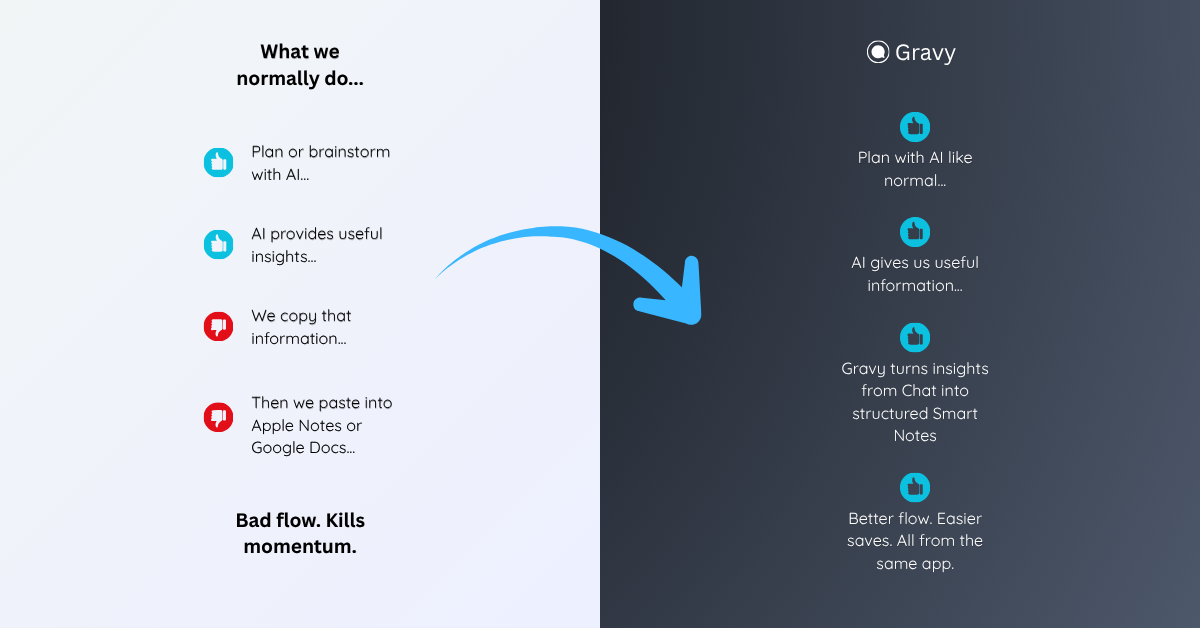
The workflow is simple. You use Gravy Chat to think normally: ask questions, test directions, plan projects, brainstorm content, or compare decisions. When the AI gives a useful response, Gravy separates that response into Smart Blocks. You choose the specific block that matters and save it as an editable Smart Note.
That turns idea tracking from “I hope I can find this later” into “this insight now has a place.” The chat can keep moving, but the idea does not disappear with it. Over time, your AI sessions become a working notebook of saved ideas, decisions, plans, and next steps instead of a long list of threads.
How to keep track of ChatGPT ideas
- Separate brainstorming from savingLet the ChatGPT conversation stay messy while you explore. Only move ideas into your tracking system when they have future value.
- Save the smallest useful ideaCapture the exact section that matters, such as a framework, hook, offer, feature, decision, checklist, or next step.
- Title the idea by future search intentUse a title like “TikTok hooks for waitlist launch” or “pricing risk assumptions” instead of “ChatGPT idea.”
- Add context and a next actionWrite why the idea mattered and what should happen next. Even “review Friday” is better than no action.
- Review tracked ideas weeklyDelete weak ideas, merge duplicates, promote strong ideas into active plans, and archive anything that no longer supports a real project.
How Gravy fits
Gravy fits this workflow because keeping track of AI ideas should happen while the conversation is still alive. You can chat normally, save useful Smart Blocks as editable Smart Notes, and build an organized idea system from the best parts of your AI thinking. That means fewer lost ideas, less copy-paste cleanup, and a clearer path from brainstorm to action.
FAQ
How do I keep track of ideas from ChatGPT?
Track ChatGPT ideas by saving only the useful sections, giving each idea a clear title, adding one sentence of context, labeling it by project or use case, and assigning a next action.
Should I save every idea ChatGPT gives me?
No. Save ideas that can become projects, decisions, drafts, features, content, research, or next steps. Skip generic or repetitive ideas that you cannot imagine using again.
Why do ChatGPT ideas disappear even though the chat is saved?
The chat may be saved, but the idea is still buried in a long thread. A saved conversation is not the same as an organized idea tracker.
What is the best format for a saved ChatGPT idea?
Use a title, the useful idea text, one context sentence, a category such as feature or content, and a next action. This makes the idea easier to find and use later.
How does Gravy help track ChatGPT ideas?
Gravy lets you save useful sections of AI responses as Smart Notes while you are still chatting, so important ideas do not stay buried inside long conversations.