How to Turn ChatGPT Conversations Into Notes Without Copy-Paste Chaos
ChatGPT Workflows
Turning ChatGPT conversations into notes is a capture workflow that extracts useful AI insights into organized, editable, and reusable knowledge.

Gravy is an AI chat notebook for the perfect thinking workspace, allowing you to capture, organize and convert insights from AI conversations into structured and editable Smart Notes.

What does it mean to turn a ChatGPT conversation into notes?
Turning a ChatGPT conversation into notes means extracting the useful parts of the chat and converting them into organized, reusable information. The goal is not to preserve every prompt and answer. The goal is to identify what the conversation produced: a framework, checklist, decision, plan, draft, summary, research takeaway, or explanation you can use again.
This distinction matters because ChatGPT conversations are usually messy by design. You ask a rough question, refine the answer, add constraints, reject some ideas, and follow a few side paths. That messy process is useful for thinking, but it does not automatically create a good note.
A note should be cleaner than the conversation that produced it. It should have a specific title, enough context to make sense later, and a clear reason for being saved. If the chat is the workshop, the note is the finished tool you keep on the shelf. You are not archiving the entire session. You are capturing the valuable output.
Why should you not convert the whole ChatGPT transcript into one note?
You should not convert the whole ChatGPT transcript into one note because a transcript preserves everything, including the parts you do not need. That may feel complete, but it creates the same problem in a new place. Instead of scrolling through ChatGPT, you end up scrolling through a giant pasted note.
| Transcript problem | What happens later | Better note move |
|---|---|---|
| Too much text | Hard to review | Extract key sections |
| Mixed topics | Purpose gets blurry | Split by idea |
| No context | Meaning fades | Add a summary line |
| Weak title | Search becomes harder | Name the future use |
The better workflow is to split the conversation into smaller notes based on use. A pricing decision becomes one note. A launch checklist becomes another. A customer avatar summary becomes another. This keeps each note focused, searchable, and easier to act on. The conversation can remain as source material, but the notes should represent the parts worth reusing. The note should create clarity, not duplicate the chat's mess.
What parts of a ChatGPT conversation should become notes?
The parts of a ChatGPT conversation that should become notes are the parts with future utility. Do not save everything that sounds interesting. Save the pieces that can help you make a decision, complete a task, write something, explain something, or continue a project later. This turns note-taking from collection into judgment.
- Save frameworks that help you think through a problem again.
- Save checklists that can guide a future workflow.
- Save decisions, assumptions, tradeoffs, and risks you may need to revisit.
- Save drafts, outlines, scripts, hooks, and reusable language.
- Save research summaries only when they include enough context or sources to verify later.
A useful filter is: “Would I search for this later?” If yes, it deserves a note. If no, leave it in the chat. For example, a broad answer about marketing may not be worth saving. A specific “five-part TikTok launch script for a waitlist page” is worth saving because it has a clear future use. Good AI notes are not just saved text. They are selected building blocks.
What is the best manual workflow for turning ChatGPT chats into notes?
The best manual workflow is to process the conversation while the context is still fresh. If you wait too long, you may remember that the chat was useful but forget which part mattered. Start by scanning the conversation for outputs, decisions, frameworks, and next steps. Then copy only the sections that can stand alone as notes.
- Review the conversation and mark the useful sections.
- Copy one useful section at a time into your note app.
- Give each note a title based on future search intent.
- Add one sentence explaining the original prompt, project, or decision.
- Label the note as a plan, draft, checklist, framework, research, reference, or decision.
This manual workflow is reliable, but it has friction. You have to move between ChatGPT and your note app, fix formatting, decide where each note belongs, and avoid saving too much. That interruption is why many people either dump entire chats into notes or avoid saving anything at all. The workflow works best when the capture standard is simple and consistent.
How does Gravy turn AI conversations into Smart Notes?
Gravy turns AI conversations into Smart Notes by making note capture part of the chat workflow. In the normal process, you have to notice a useful ChatGPT answer, highlight the right text, copy it, open a note app, paste it, clean it up, title it, and return to the conversation. Gravy is built to remove that handoff.
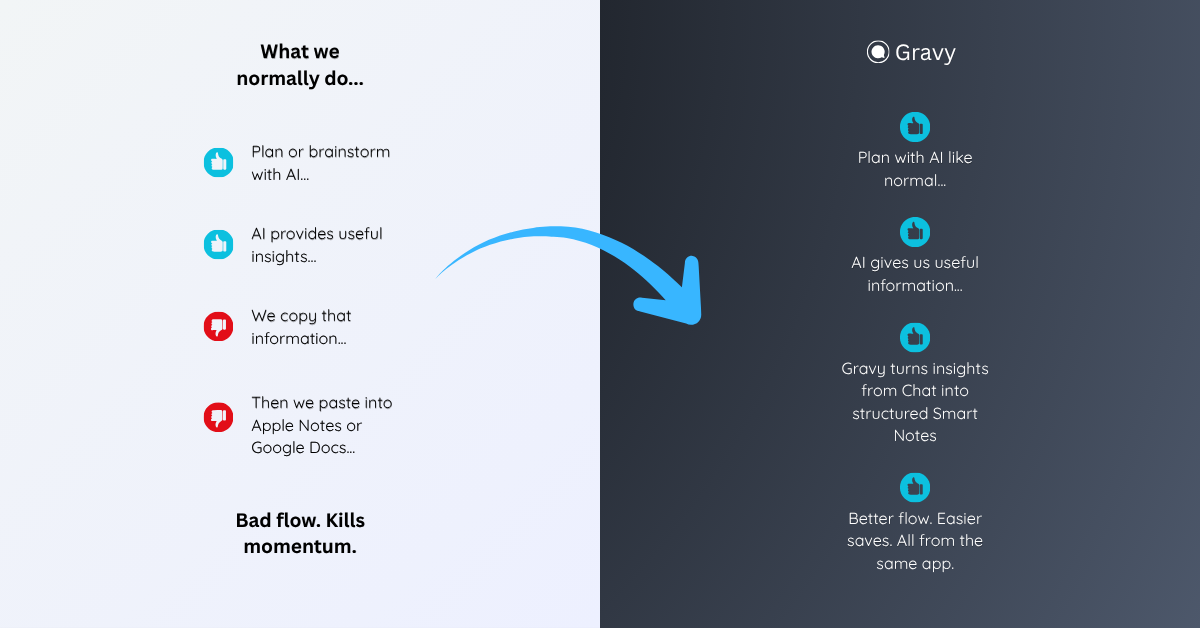
You use Gravy Chat normally to brainstorm, research, plan, learn, outline, or think through decisions. When the AI gives a useful response, Gravy separates the answer into Smart Blocks. Instead of saving the whole response, you choose the block that matters and save it as an editable Smart Note in the same workspace.
That means the conversation can stay fluid while the useful parts become organized knowledge. A plan becomes a note. A framework becomes a note. A decision summary becomes a note. Gravy keeps the best output from AI chat from becoming buried in a thread or scattered across screenshots and pasted documents.
How to turn ChatGPT conversations into notes
- Scan the conversation for outputsLook for frameworks, checklists, decisions, drafts, summaries, research takeaways, and next steps. Ignore filler, repeated explanations, and rejected directions.
- Split the chat into separate note ideasDo not make one giant note from the whole transcript. Create one note per useful idea, decision, draft, checklist, or framework.
- Save only the useful sectionCopy the smallest complete section that can stand on its own. If it needs more meaning, add a context sentence instead of copying extra clutter.
- Title and label each noteUse future-facing titles and labels such as plan, decision, draft, checklist, framework, research, or reference.
- Review notes before filing them awayClean up formatting, delete weak saves, merge duplicates, and move the strongest notes into the project or workflow where they belong.
How Gravy fits
Gravy fits this workflow because turning AI conversations into notes should not require manual transcript cleanup. You can chat normally, choose useful Smart Blocks, and save them as editable Smart Notes while the conversation is still active. That gives you a clean path from AI thinking to organized knowledge without dragging the whole chat into your notes.
FAQ
How do I turn a ChatGPT conversation into notes?
Scan the conversation for useful outputs, split them into separate note ideas, save only the relevant sections, add context, and organize each note by project or future use.
Should I save the entire ChatGPT conversation as one note?
Usually no. Full transcripts are hard to review and search. It is better to extract the specific frameworks, checklists, drafts, decisions, or summaries you will actually reuse.
What should I include in a note from ChatGPT?
Include a clear title, the useful AI answer, one sentence of context, a label such as plan or decision, and any next action that makes the note useful later.
What is the easiest way to organize ChatGPT notes?
Organize ChatGPT notes by project, decision, workflow, or content type. Avoid one giant folder called ChatGPT because it becomes hard to search over time.
How does Gravy help turn AI conversations into notes?
Gravy separates AI responses into Smart Blocks and lets you save the useful parts as editable Smart Notes, so the best insights do not stay buried inside long chat threads.