How to Take Notes While Using ChatGPT Without Breaking Your Thinking Flow

ChatGPT Workflows
Taking notes while using ChatGPT is a capture workflow that turns useful AI answers into organized, searchable notes while you keep thinking.

Gravy is an AI chat notebook for the perfect thinking workspace, allowing you to capture, organize and convert insights from AI conversations into structured and editable Smart Notes.

What is the best way to take notes while using ChatGPT?
The best way to take notes while using ChatGPT is to capture useful answers during the conversation, not after the entire thread is finished. ChatGPT is good for exploring ideas, asking follow-ups, comparing options, and thinking out loud. Notes are for preserving the parts of that thinking you will need again. The workflow breaks when you treat the whole chat as the note.
I recommend separating live thinking from durable capture. Live thinking can stay messy. Your notes should be selective. Save the framework, checklist, decision, explanation, table, draft, or research summary that has future value. Skip the generic setup paragraphs and anything that only helped you move to the next prompt.
A practical ChatGPT note should answer four questions: what is this, why did I save it, where will I use it, and how will I find it later? If the note does not answer those questions, you may technically save the answer, but you are still creating future search work for yourself.
Why does taking notes during ChatGPT conversations feel so clunky?
Taking notes during ChatGPT conversations feels clunky because you are usually switching between two different modes: thinking and filing. In ChatGPT, you are asking questions, reacting, refining, and moving quickly. In a note app, you are naming, organizing, formatting, and deciding where something belongs. Those are different mental tasks.
The common workaround is copy-paste. You highlight part of the AI response, switch to Apple Notes, Notion, Google Docs, or another app, create a note, paste the text, fix the formatting, maybe add a title, then return to ChatGPT. By the time you get back, the thought you were following may feel weaker.
| Friction point | What happens | Better approach |
|---|---|---|
| Scrolling | Ideas get buried | Capture while fresh |
| Copy-paste | Flow gets interrupted | Save from the chat |
| Screenshots | Text is hard to reuse | Save editable text |
| Vague titles | Search fails later | Name the future use |
That is why the issue is not laziness or poor discipline. The workflow itself asks you to stop thinking in order to preserve your thinking. A better system should make capture feel lightweight enough that you can save the insight without losing the thread that created it.
What should you actually write down from a ChatGPT session?
You should write down the parts of a ChatGPT session that can become useful outside the chat. That usually means outputs, decisions, frameworks, and reusable language. You do not need to save every answer. If you do, your notes become another version of the transcript, and you recreate the same problem you were trying to escape.
- Save frameworks that help you think through a problem again.
- Save checklists that can guide a future task or workflow.
- Save decisions, assumptions, and tradeoffs you may need to revisit.
- Save strong wording, examples, scripts, or summaries you may reuse.
- Save research takeaways only when they include sources or can be verified later.
The best filter is future use. Ask: “What will I do with this note?” If the answer is unclear, do not save it yet. If the answer is specific, save it with that purpose in the title. For example, “weekly review prompt framework” is better than “good ChatGPT answer.” The title should describe the job the note will do.
What note-taking structure works best for ChatGPT answers?
The best note-taking structure for ChatGPT answers is simple enough to use mid-conversation and structured enough to make sense later. I would not overbuild it. The more fields you require, the less likely you are to capture the answer while the conversation is alive. Start with a lightweight template.
- Title the note by future search intent.
- Paste or save only the useful section of the AI answer.
- Add one sentence explaining the context.
- Label the note as a plan, framework, draft, decision, research, or reference.
- Link it to the project, goal, or conversation it supports.
This mirrors how strong learning notes work: cues help you find the idea, details preserve the substance, and a summary tells you why it matters. For AI notes, the context sentence is especially important because ChatGPT answers can look generic once removed from the original question. A short line like “Use this as the first draft of the launch checklist” keeps the note actionable.
How does Gravy make taking notes with AI chat easier?
Gravy makes taking notes with AI chat easier by removing the gap between the conversation and the notebook. In a normal workflow, you chat in one place and save notes somewhere else. That creates friction at the exact moment you should be staying with the idea. Gravy keeps those two parts of the workflow side by side.
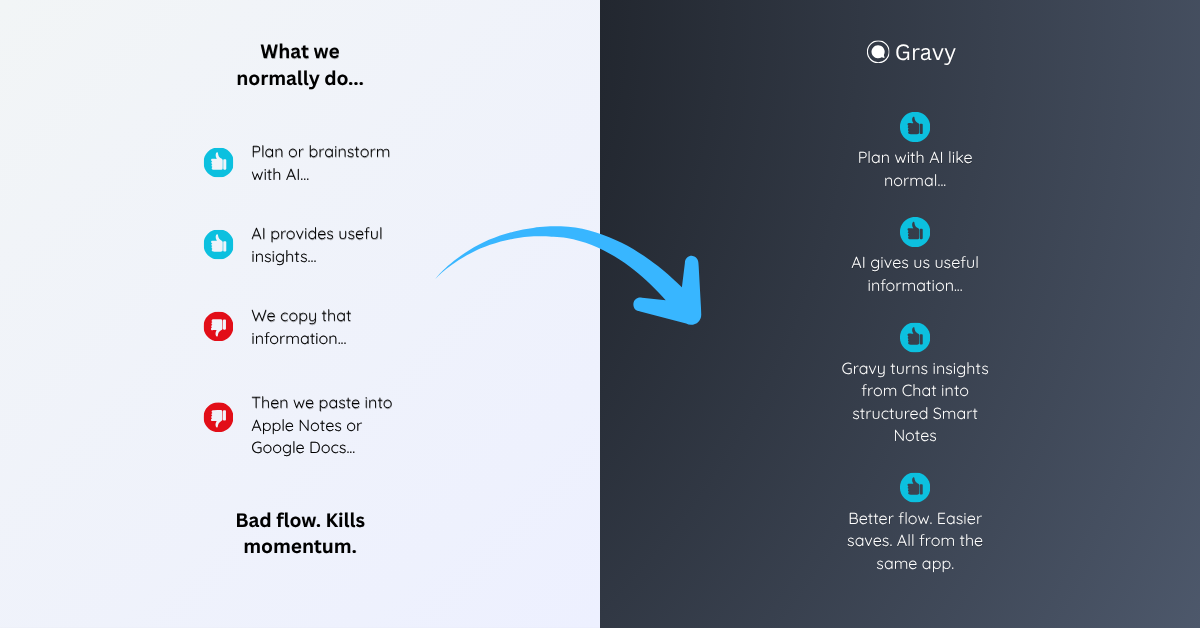
You use Gravy Chat like a normal AI assistant: ask questions, brainstorm, research, plan, compare, and refine. When a response contains something worth keeping, Gravy breaks it into Smart Blocks. Instead of copying a whole AI answer, you choose the useful section and save it as an editable Smart Note.
That changes note-taking from a cleanup task into a live capture habit. The insight is saved while the reason it matters is still fresh. Later, you are not hunting through screenshots, scrolling through a giant thread, or asking the AI to recreate an old idea. You already have the useful answer in your notebook.
How to take notes while using ChatGPT
- Start the chat with a clear goalBefore the conversation gets long, decide what kind of output you are looking for: a plan, explanation, checklist, decision, draft, or research summary.
- Watch for reusable sectionsDuring the conversation, look for answers that you would realistically search for again. Do not wait until the end of the thread to decide what mattered.
- Capture the smallest useful partSave the exact section that has value. Avoid copying the whole response unless every part of the response is useful.
- Add context immediatelyWrite one sentence explaining why the answer matters, which project it belongs to, or what you plan to do with it.
- Review and refine the note laterAt the end of the session or week, clean up saved AI notes, merge duplicates, and turn the best captures into plans, drafts, or decisions.
How Gravy fits
Gravy fits this workflow because taking notes from AI should not require leaving the conversation. You can chat normally, save useful Smart Blocks as editable Smart Notes, and keep your best AI insights organized while you are still thinking. That makes Gravy useful for people who use AI to plan, brainstorm, learn, and make decisions.
FAQ
How do I take notes while using ChatGPT?
Take notes by saving only the useful parts of ChatGPT answers, adding a clear title, writing one context sentence, and organizing the note by project, decision, or future use.
Should I copy every ChatGPT answer into notes?
No. Copying every answer creates clutter. Save only answers that can become plans, frameworks, checklists, drafts, decisions, research takeaways, or reusable explanations.
What is the best note format for ChatGPT answers?
A strong format includes a search-friendly title, the useful AI answer, a short context sentence, a label such as plan or decision, and a project or goal connection.
Why is it hard to take notes from AI chat?
It is hard because useful answers appear while you are still thinking. Switching apps to copy, paste, title, and organize notes interrupts the conversation and often causes context to be lost.
How does Gravy help with ChatGPT note-taking?
Gravy helps by letting you save useful sections of AI responses as Smart Notes inside the same workspace, so you do not have to copy-paste or screenshot important answers.