How to Save Perplexity Answers You Want to Keep
AI Productivity
Saving Perplexity answers is a capture workflow that turns useful AI search responses into organized, searchable, and reusable notes.

Gravy is an AI chat notebook for the perfect thinking workspace, allowing you to capture, organize and convert insights from AI conversations into structured and editable Smart Notes.

What is the best way to save Perplexity answers you want to keep?
The best way to save Perplexity answers you want to keep is to capture the useful part of the answer as a note, then preserve the sources and context that made the answer valuable. Perplexity is strong for AI search because it can combine an answer with citations, but the answer still needs to become a reusable object if you plan to use it later.
Do not save every answer by default. Save the answers that help you understand a topic, compare options, make a decision, build a plan, write a brief, or verify a claim. If the answer is only useful for the moment, leave it in the thread. If the answer could support future work, move it into a notebook with a clear title.
The key is to save the answer as working knowledge, not just as a link to a past search. A saved answer should explain what you learned, why it matters, and where you will use it next.
Why are Perplexity threads not enough for long-term note-taking?
Perplexity threads are useful as a record of what you searched and how the answer developed, but they are not always enough for long-term note-taking. A thread is still chronological. It may contain the original question, follow-ups, source links, refinements, and extra details you do not need later. That is useful for research traceability, but messy for reuse.
| Saved item | What it preserves | What may still be missing |
|---|---|---|
| Thread | Conversation history | Focused takeaway |
| Bookmark | Fast access | Context and next action |
| Screenshot | Visual memory | Editable text |
| Notebook note | Reusable insight | Requires selection |
The problem shows up later when you remember the answer but not the thread. You may know Perplexity found a helpful comparison, source, or summary, but you still have to reopen old work and scan for the exact part that mattered. A proper note solves that by separating the insight from the search session. The thread can remain the source trail, while the note becomes the usable takeaway.
What parts of a Perplexity answer should you save?
The parts of a Perplexity answer worth saving are the sections that can support future work. Because Perplexity is often used for search, research, and source-backed explanations, the valuable part is usually not just the answer. It is the answer plus the sources, conclusion, comparison, or decision it helped you reach.
- Save research summaries that explain a topic clearly.
- Save source-backed claims you may need to cite or verify later.
- Save comparison tables that help you choose between options.
- Save explanations that turn a confusing topic into plain language.
- Save decisions, risks, next steps, and assumptions that came from the answer.
A simple filter is: “Will this answer help me write, decide, explain, plan, or verify something later?” If yes, save it. If the answer is only a quick fact check, the thread may be enough. For deeper work, save the useful section as a note and include the source links or a pointer back to the original Perplexity thread so the reasoning can be checked later.
What notebook structure works best for saved Perplexity answers?
The best notebook structure for saved Perplexity answers is a research-note format. Perplexity answers often matter because they connect an explanation to sources, so your note should preserve both. A pasted answer without source context can become hard to trust later. A note with a title, takeaway, source links, and next action stays useful.
- Title the note by future search intent, such as “best AI note app comparison.”
- Save the useful answer section, not the full thread by default.
- Add a one-sentence takeaway explaining what the answer changed or clarified.
- Keep source links, citation notes, or a pointer back to the original thread.
- Label the note as research, decision, reference, comparison, plan, or draft.
This structure is especially helpful when you use Perplexity for market research, product decisions, content research, travel planning, competitive analysis, or learning. It prevents your notebook from becoming a pile of pasted search results. The note should tell you what the answer means and what to do with it, not just repeat what the AI said.
How does Gravy help save Perplexity-style AI answers as notes?
Gravy helps save Perplexity-style AI answers as notes by focusing on the same problem across AI tools: useful answers appear inside conversations, but reusable knowledge needs structure. Whether the answer comes from Perplexity, ChatGPT, Claude, Gemini, or another assistant, the hard part is turning the useful section into a note before it gets buried.
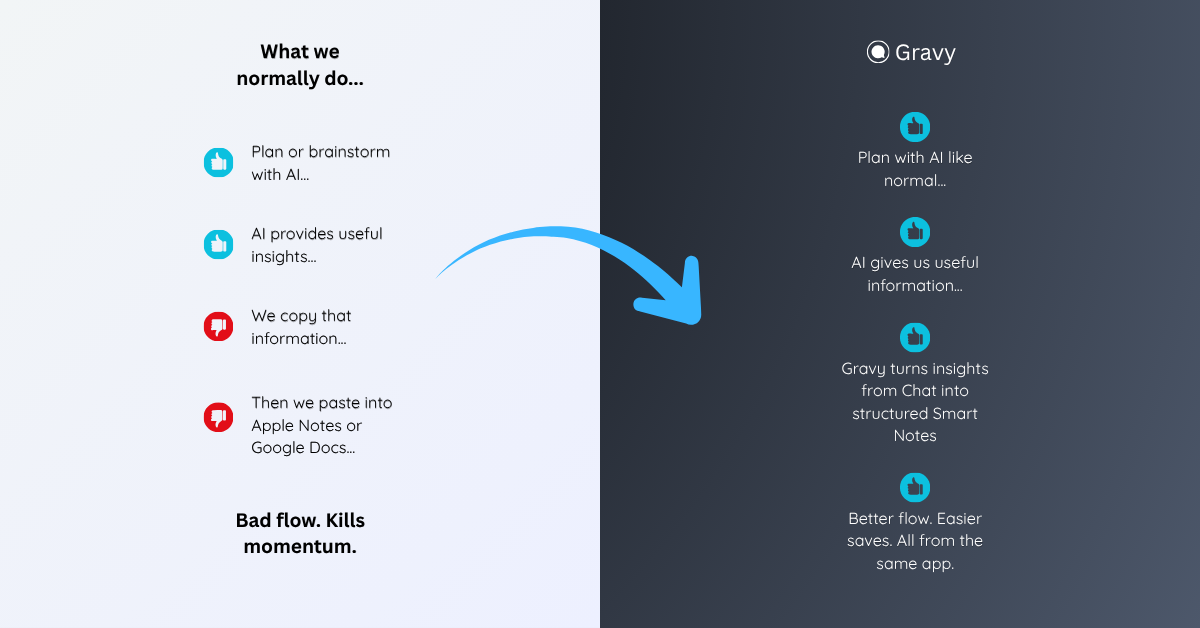
With Gravy, you use Gravy Chat normally to research, brainstorm, plan, compare options, or think through a decision. When the AI gives a useful response, Gravy separates the response into Smart Blocks. Instead of copying the whole answer, screenshotting it, or relying on a saved thread, you choose the exact section worth keeping and save it as an editable Smart Note.
That gives you a better long-term workflow. The source conversation can remain available, but the useful answer becomes organized, editable, and easier to reuse. For people who use AI search and AI chat heavily, that difference matters because the value is not just getting answers. The value is keeping the answers that move your work forward.
How to save Perplexity answers you want to keep
- Decide whether the answer is reusableSave answers that support a future decision, draft, plan, explanation, research summary, comparison, or source-backed claim.
- Capture the useful sectionDo not save the entire thread by default. Copy or save the exact section that contains the insight, conclusion, table, source-backed point, or next step.
- Preserve the sourcesKeep important source links, citations, or a pointer back to the original Perplexity thread so you can verify the answer later.
- Add a clear title and takeawayUse a title your future self would search for, then write one sentence explaining what the answer helped you understand or decide.
- Review saved AI research weeklyDelete weak saves, merge related answers, update outdated research, and move strong notes into active documents, projects, or decisions.
How Gravy fits
Gravy fits this workflow because saving AI answers should not depend on screenshots, scattered bookmarks, or manual copy-paste. You can chat normally, choose the useful Smart Block, and save it as an editable Smart Note while the answer is still fresh. That gives you a cleaner way to keep Perplexity-style research, summaries, comparisons, and decisions organized.
FAQ
How do I save Perplexity answers I want to keep?
Save the useful section of the answer, keep important sources, add a clear title, write one takeaway sentence, and organize the note by project, topic, or future use.
Should I save the whole Perplexity thread or just the answer?
Save the whole thread when you need the full research trail. For everyday reuse, save the specific answer section, sources, and takeaway that matter.
What Perplexity answers are worth saving?
Save research summaries, source-backed claims, comparisons, explanations, decisions, risks, assumptions, and next steps that you may need to reuse or verify later.
Is screenshotting Perplexity answers a good idea?
Screenshots are fast, but they are weak for long-term use because the text is harder to edit, organize, and reuse. Editable notes with source links are usually better.
How does Gravy help with saving Perplexity-style answers?
Gravy lets you save useful AI response sections as Smart Notes, so important answers become organized notes instead of staying buried in threads, screenshots, or copied text.