How to Save AI Insights While You Think
AI Productivity
Saving AI insights is a capture workflow that preserves useful ideas from AI conversations while your thinking is still active.

Gravy is an AI chat notebook for the perfect thinking workspace, allowing you to capture, organize and convert insights from AI conversations into structured and editable Smart Notes.

What does it mean to save AI insights while you think?
Saving AI insights while you think means capturing useful ideas during the AI conversation, not hours later after the context has faded. An AI insight might be a clear explanation, a better angle, a decision, a checklist, a product idea, a research summary, or a phrase that finally makes your thinking click.
The important part is timing. When you are using AI to brainstorm, plan, research, or solve a problem, your thoughts are moving quickly. The insight appears in the middle of that flow. If you stop too long to organize it, you lose momentum. If you do nothing, the insight gets buried under the next prompt.
A good capture system solves both problems. It lets you mark the useful section, keep enough context, and continue thinking. The note does not have to be perfect immediately. It just needs to preserve the insight before the conversation moves on. It turns a passing answer into a usable note before the thread becomes crowded.
Why do AI insights get lost during conversations?
AI insights get lost during conversations because the chat keeps producing more material. A useful answer can be followed by ten refinements, a new direction, a rejected idea, a source check, or a completely different topic. The insight still exists inside the thread, but it stops being easy to find. That is the difference between stored and usable.
| What happens in the chat | Why the insight gets lost | Better capture move |
|---|---|---|
| You keep prompting | The answer moves up the thread | Save the section |
| You copy later | Context fades | Capture immediately |
| You screenshot | Text is hard to reuse | Save editable text |
| You paste everything | Notes become cluttered | Extract the insight |
This is why many people remember that ChatGPT, Claude, Gemini, or Perplexity gave them something useful, but cannot find the exact answer later. Search and history help, but they still make you reconstruct the moment. Saving the insight while it happens prevents the thread from becoming the only place your best thinking lives.
How does Gravy save AI insights while chatting?
Gravy saves AI insights while chatting by removing the separate copy-paste step between AI conversation and notebook. In the manual workflow, you chat in one app, notice a useful answer, highlight the text, copy it, open a note app, paste it, clean up formatting, add a title, and return to the conversation. That is too much friction for active thinking.
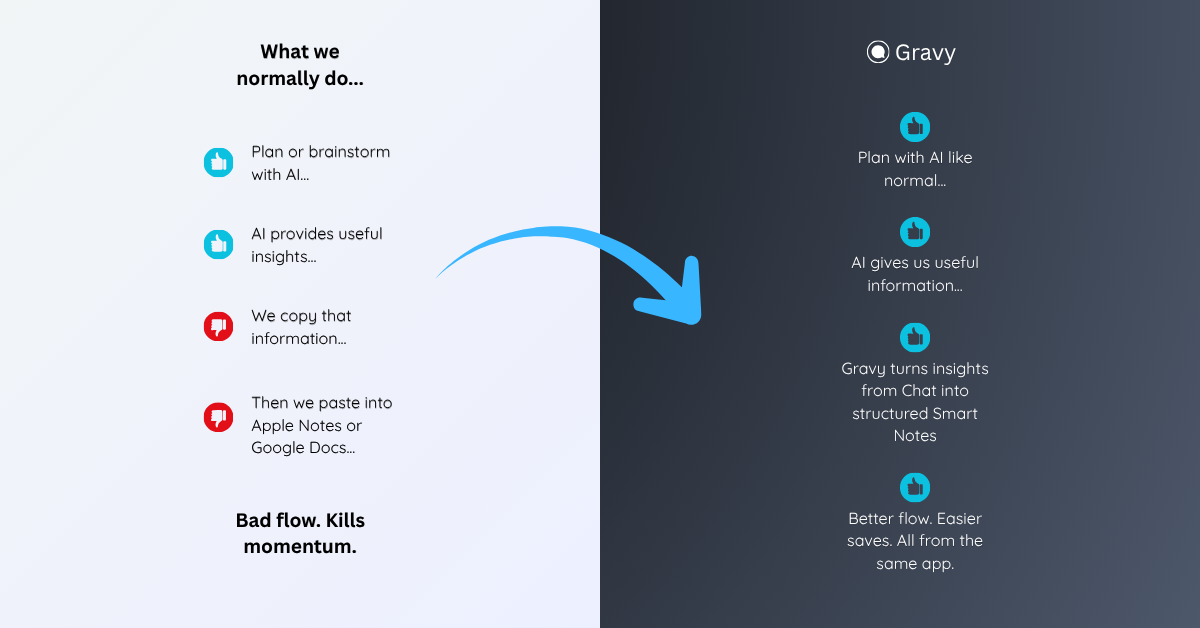
Gravy keeps the capture moment inside the AI workspace. You use Gravy Chat normally to brainstorm, research, plan, learn, compare options, or work through a decision. When the AI gives a useful response, Gravy breaks the response into Smart Blocks. You select the block that matters and save it as an editable Smart Note.
That means the insight is captured while it still makes sense. You do not need to preserve the entire conversation just to keep one useful idea. The chat can keep moving, and the insight gets its own organized place. This keeps capture fast enough for real brainstorming, not just post-session filing.
What AI insights should you save immediately?
You should save AI insights immediately when they change what you understand, decide, write, plan, or build. Not every answer needs to become a note. The strongest saves are the outputs that would be painful to recreate later or useful in more than one context.
- Save decisions that explain what direction you chose and why.
- Save frameworks that help you think through a problem again.
- Save checklists that turn an answer into repeatable action.
- Save drafts, outlines, hooks, and phrases you may reuse.
- Save research takeaways when the source or reasoning matters.
A simple filter is: “Would I search for this later?” If the answer is yes, save it. If the answer is only useful for the current prompt, leave it in the chat. The goal is not to capture every AI response. The goal is to preserve the moments where the AI conversation produces reusable thinking. These are the moments most likely to become useful work later. Save decisively.
How do you organize AI insights after capture?
You organize AI insights after capture by giving each note a future-facing title, a useful label, and a clear next action. The first capture can be quick. The later organization step makes the saved insight easier to retrieve and reuse. Without that second step, even good saves can turn into another messy pile.
- Rename the note using the phrase you would search later.
- Label it as a plan, draft, checklist, framework, research, reference, or decision.
- Add one context sentence explaining the original prompt or project.
- Connect the note to a project, topic, or active goal.
- Review saved insights weekly to merge, delete, promote, or archive them.
The best system keeps capture lightweight and review intentional. During the conversation, save the insight before it disappears. After the session, clean up only the notes worth keeping. This protects your creative flow while still giving your best AI ideas a permanent place. Your system should protect momentum first, then support retrieval later.
How to save AI insights while you think
- Notice the reusable momentSave the answer when it clarifies an idea, improves a plan, creates a draft, supports a decision, or gives you a reusable framework.
- Capture the smallest useful sectionDo not save the entire AI response by default. Keep the exact section that contains the insight.
- Add context quicklyWrite one sentence explaining the original question, project, decision, or reason the insight mattered.
- Keep thinkingDo not turn every capture into a cleanup session. Preserve the insight first, then continue the conversation.
- Review after the sessionRename, label, merge, delete, or promote saved insights after the thinking session is finished.
How Gravy fits
Gravy fits this workflow because AI insights are easiest to save when capture happens inside the conversation. You can chat normally, choose the useful Smart Block, and save it as an editable Smart Note while the idea is still fresh. That helps you preserve useful AI thinking without breaking your flow.
FAQ
How do I take notes from ChatGPT conversations?
Take notes from ChatGPT conversations by saving the useful section, adding one context sentence, giving the note a searchable title, and labeling it by future use.
Can I save only part of a ChatGPT answer?
Yes. Saving only the useful part is usually better than saving the entire answer because it keeps your notes focused, editable, and easier to reuse later.
How do I stop losing good ChatGPT ideas?
Capture good ChatGPT ideas as soon as they appear. Save the insight, context, title, and next action before the conversation moves on.
What app saves AI responses as notes?
Traditional note apps can store copied AI responses, but an AI chat notebook like Gravy is designed to save useful response sections as organized notes while you chat.
Should I organize AI notes during or after chatting?
Capture during the chat, then organize after the session. This keeps your thinking flow intact while still giving important AI insights a clear place.