How to Save Gemini Responses to a Notebook Without Losing Useful AI Ideas
AI Productivity
Saving Gemini responses to a notebook is a capture workflow that turns useful AI answers into organized, searchable, and reusable notes.

Gravy is an AI chat notebook for the perfect thinking workspace, allowing you to capture, organize and convert insights from AI conversations into structured and editable Smart Notes.

What is the best way to save Gemini responses to a notebook?
The best way to save Gemini responses to a notebook is to capture the part of the answer you will actually reuse, then add enough context to make it useful later. Do not treat the entire chat as the note. Gemini can help you brainstorm, research, write, summarize, compare options, and think through decisions, but the notebook should hold the reusable output, not every turn of the conversation.
A good saved Gemini response should be smaller and cleaner than the original answer. If Gemini gives you a long response with background, examples, a table, and a recommendation, you may only need the table or recommendation. Save that part. Then add a title that describes the future use, such as “launch email outline,” “pricing tradeoff summary,” or “customer interview questions.”
This is the difference between archiving and note-taking. Archiving preserves the history. Note-taking creates working knowledge. If you want to use the answer again, convert it into a note while the reason it matters is still fresh.
Should you use Google Docs, Google Keep, or another notebook for Gemini responses?
You should choose the notebook based on what you plan to do with the Gemini response after saving it. Google Docs is strong when the response needs to become a memo, article, brief, proposal, research document, or collaborative draft. A lightweight notes app is better when the response is a quick reminder, short checklist, or personal idea. A structured workspace is better when the response belongs inside a project system.
| Notebook option | Best for | Main limitation |
|---|---|---|
| Google Docs | Long-form drafts and collaboration | Heavy for small captures |
| Google Keep | Quick reminders and simple notes | Less structure for deep projects |
| Notion or similar | Databases and project systems | More setup required |
| AI chat notebook | Capturing AI insights from chat | Best when AI is the source |
The clean test is: will this response become a document, a task, or a reusable idea? If it becomes a document, use Google Docs. If it becomes a quick reminder, use a lightweight note. If it becomes an idea you want to connect to future AI work, use an AI-native notebook. The wrong tool creates friction, and friction is why good Gemini answers get lost.
Why does manually saving Gemini answers get messy over time?
Manually saving Gemini answers gets messy because each save creates a small interruption. You notice a useful response, highlight the text, copy it, switch to a notebook, create or find the right note, paste the answer, fix formatting, add a title, and return to the chat. That is manageable once. It becomes painful when you are in a long brainstorming or research session.
The other problem is over-saving. Because copying is annoying, people often copy the whole response instead of selecting the useful section. That moves the clutter from Gemini into the notebook. Later, the notebook contains long pasted answers with vague titles like “Gemini notes” or “AI ideas,” and you still have to skim to find the actual insight.
- Full pasted responses create long notes that are hard to review.
- Missing context makes the saved answer feel random later.
- Vague titles make search less useful.
- Scattered tools split related AI insights across too many places.
- Screenshots preserve the answer visually but make text harder to edit and reuse.
What should every saved Gemini response include?
Every saved Gemini response should include five elements: a future-facing title, the useful answer section, a context sentence, a label, and a next action. The title helps you search. The saved section gives you the substance. The context sentence explains why the answer mattered. The label shows how to use it. The next action keeps the idea from becoming passive storage.
- Title the note by future search intent, not by the date or chat topic.
- Save only the Gemini response section that has future value.
- Add one sentence explaining the original prompt, project, or decision.
- Label the note as a plan, draft, checklist, framework, research, reference, or decision.
- Add the next action, such as review, test, rewrite, publish, build, or archive.
This structure turns Gemini output into a working notebook. A note called “Gemini response” will not help much later. A note called “onboarding email sequence for free trial users” tells you exactly why the saved answer matters. Clear structure is especially important when you save many AI responses across research, planning, writing, and decision-making.
How does Gravy help save Gemini-style AI responses as notes?
Gravy helps save Gemini-style AI responses as notes by making capture part of the AI chat workflow. The core problem is not limited to one AI tool. Whether you use Gemini, ChatGPT, Claude, or another assistant, the same pattern appears: useful ideas show up inside a conversation, then get buried unless you manually move them somewhere else.
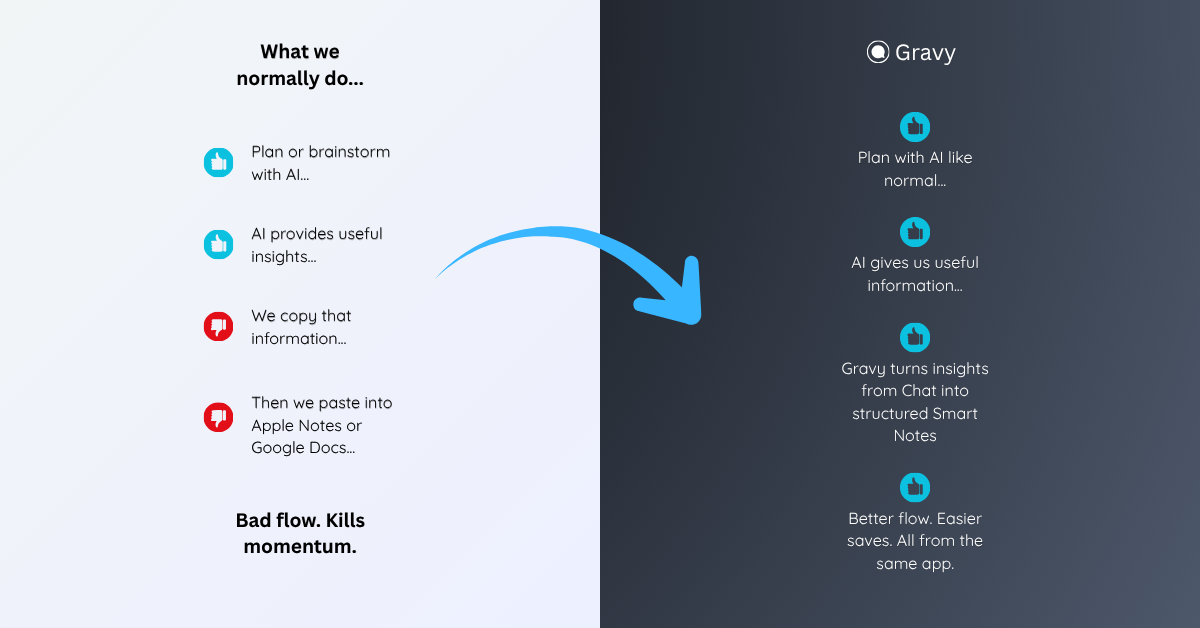
Gravy is built around that moment. You use Gravy Chat normally to brainstorm, research, plan, learn, compare options, or think through a decision. When the AI gives a useful response, Gravy separates the answer into Smart Blocks. Instead of copying the whole response into a notebook, you choose the section that matters and save it as an editable Smart Note.
That gives you the benefit people want from saving Gemini responses, but with less cleanup. The useful section becomes organized text while the conversation is still fresh. You keep the flow of thinking, avoid screenshot clutter, and build a notebook from the best parts of your AI work.
How to save Gemini responses to a notebook
- Decide whether the response is worth savingSave responses that can become plans, drafts, checklists, research notes, decision summaries, frameworks, or reusable explanations.
- Capture the smallest useful sectionDo not copy the whole Gemini answer by default. Save the exact section that can stand on its own later.
- Choose the right notebook destinationUse Google Docs for long-form work, a simple notes app for quick capture, or an AI chat notebook when the response comes from ongoing AI thinking.
- Add title, context, and labelCreate a search-friendly title, write one context sentence, and label the note by type, project, or next action.
- Review saved AI notes weeklyClean up weak captures, merge duplicates, move strong notes into active projects, and archive anything that no longer supports a real goal.
How Gravy fits
Gravy fits this workflow because saving Gemini responses should not depend on manual copy-paste, screenshots, or long exports. You can chat normally, choose the useful Smart Block, and save it as an editable Smart Note while the idea is still fresh. That gives you a cleaner way to turn AI responses into an organized notebook.
FAQ
How do I save Gemini responses to a notebook?
Copy the useful section of the Gemini response, paste it into your notebook, add a clear title, write one context sentence, and label it by project, topic, or future use.
Can I export my Gemini Apps data?
Yes. Google says Gemini Apps data can be downloaded through Google Takeout. Exports are useful for records, but they are not the same as a selective note-taking system.
Should I save full Gemini conversations or only useful responses?
Save full conversations only when you need an archive. For everyday productivity, save the specific response sections you will reuse, such as plans, drafts, checklists, frameworks, or decisions.
Is Google Docs good for saving Gemini answers?
Google Docs is useful when a Gemini response needs to become a document, brief, article, proposal, or collaborative draft. It may be heavier than necessary for small idea captures.
How does Gravy help with saving Gemini responses?
Gravy lets you save useful AI response sections as Smart Notes while you are still chatting, so important ideas do not stay buried inside long conversations or scattered across notebooks.