How to Save Only Part of a ChatGPT Response Without Losing Context
ChatGPT Workflows
Saving only part of a ChatGPT response is a capture workflow that preserves the useful section without turning your notes into messy transcripts.

Gravy is an AI chat notebook for the perfect thinking workspace, allowing you to capture, organize and convert insights from AI conversations into structured and editable Smart Notes.

Why should you save only part of a ChatGPT response?
You should save only part of a ChatGPT response because the full answer often contains more than you actually need. ChatGPT may give background, examples, alternatives, caveats, and a final recommendation in one response. That can be useful while you are thinking, but it becomes clutter when you are building a note system.
The useful part is usually smaller than the response. It might be one checklist, one table, one paragraph, one framework, one decision summary, or one phrase you want to reuse. If you save the full answer every time, your notes become long transcripts. Later, you still have to scan and extract the same useful section you could have saved at the beginning.
The goal is not to preserve everything ChatGPT said. The goal is to preserve the part that will help you later. Selective saving turns AI output into reusable knowledge instead of a pile of copied answers. It also keeps your future notes easier to review during real work.
What goes wrong when you save the whole ChatGPT answer?
When you save the whole ChatGPT answer, you often move the clutter from the chat into your notes. The answer may include helpful material, but it may also include wording you do not need, repeated points, generic setup, or multiple directions you rejected. The note looks complete, but it is harder to use.
| Full-response problem | What happens later | Better move |
|---|---|---|
| Too much text | Hard to review | Save one useful section |
| Mixed ideas | Purpose becomes unclear | Split into separate notes |
| No context | Meaning fades | Add a context sentence |
| Weak title | Search fails | Name the future use |
The other problem is that full-response saving rewards hoarding instead of judgment. You feel productive because you saved something, but you did not decide what mattered. A strong note requires selection. It says, “This is the part I will reuse.” That choice makes the note smaller, clearer, and easier to retrieve when you are working under pressure. That discipline is what separates a useful note from another archive.
How do you decide which part of a ChatGPT response to save?
Decide which part of a ChatGPT response to save by looking for future utility. Do not ask, “Is this interesting?” Ask, “Will I use this again?” That question changes the capture process. It pushes you to save assets, not impressions.
- Save the checklist if it can guide a future task.
- Save the framework if it helps you think through a decision again.
- Save the table if it compares options clearly.
- Save the paragraph if it explains something in reusable language.
- Save the decision summary if it captures reasoning you may revisit.
A good partial save should stand on its own after the conversation is closed. If the selected text only makes sense when surrounded by the rest of the response, either save a slightly larger section or add a context sentence. For example, “Use this as the objection-handling section for the landing page” makes a saved paragraph much more useful. The saved part should be small, but not orphaned.
What is the best manual workflow for saving part of a ChatGPT answer?
The best manual workflow is to copy only the useful section, paste it into one consistent note system, and immediately add enough context to make the excerpt useful later. The trap is copying a section quickly and telling yourself you will organize it later. Later, the reason you saved it is less obvious.
- Highlight the smallest complete section that has future value.
- Copy it into Apple Notes, Notion, Google Docs, Obsidian, or your main note system.
- Title the note based on the future use, not the current chat topic.
- Add one sentence explaining the prompt, project, or decision behind it.
- Label it as a checklist, framework, draft, research, plan, reference, or decision.
This workflow works, but it still has friction. You have to switch apps, manage formatting, decide where the note belongs, and return to ChatGPT. That interruption is why many people save too much, screenshot instead, or skip capture entirely. The manual workflow is strongest when you keep it disciplined and light.
How does Gravy help you save only the useful part of an AI response?
Gravy helps you save only the useful part of an AI response by making selection part of the chat workflow. In a normal ChatGPT workflow, the response appears as one block of text, and you decide whether to copy everything, highlight manually, screenshot, or leave it in the thread. Gravy is built around a cleaner capture step.
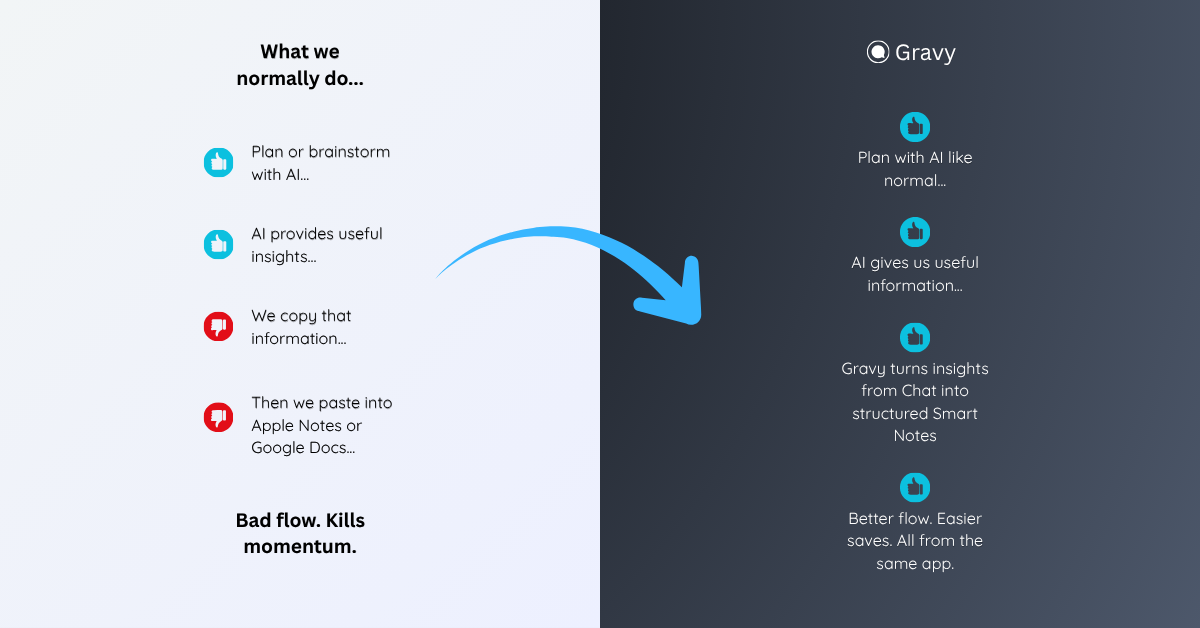
You use Gravy Chat normally to brainstorm, plan, research, learn, or think through a decision. When the AI gives a response, Gravy separates it into Smart Blocks. That means you can choose the specific section that matters instead of saving the entire answer. With one click, the useful Smart Block becomes an editable Smart Note.
This matters because the best AI insight is often one part of a bigger answer. Gravy lets the chat keep flowing while the useful section becomes organized knowledge. You avoid the two common extremes: losing the idea in the thread or saving a bloated transcript you have to clean up later.
How to save only part of a ChatGPT response
- Find the reusable sectionLook for the checklist, paragraph, framework, table, decision summary, or draft section you would actually search for again.
- Avoid saving the whole answer by defaultOnly save the full response if every part has future value. Otherwise, capture the smallest complete section that can stand on its own.
- Add a future-facing titleUse a title like “launch risk checklist” or “customer objection framework” instead of “ChatGPT response.”
- Preserve the contextWrite one sentence explaining the original question, project, or decision so the saved section still makes sense later.
- Organize by use caseLabel the saved section as a plan, draft, checklist, framework, research note, reference, or decision so retrieval is easier.
How Gravy fits
Gravy fits this workflow because saving part of an AI response should not require manual highlighting, copy-paste cleanup, or screenshots. You can chat normally, choose the useful Smart Block, and save it as an editable Smart Note while the context is still fresh. That gives you the useful part of the answer without dragging the whole transcript into your notes.
FAQ
Can I save only part of a ChatGPT response?
Yes. You can manually copy the useful section and save it in a note app. The best workflow is to save the smallest complete section, add context, and title it by future use.
Should I save the whole ChatGPT answer or only part of it?
Save only the part you will reuse unless the entire answer has value. Full-response saving often creates clutter and makes the useful idea harder to find later.
What part of a ChatGPT response is worth saving?
Save frameworks, checklists, tables, decision summaries, strong explanations, reusable wording, drafts, research takeaways, or anything you can imagine searching for again.
How do I keep context when saving part of a ChatGPT answer?
Add one sentence explaining the original prompt, project, or decision behind the saved section. That keeps the excerpt from feeling random after the chat is closed.
How does Gravy help save only the useful part of AI responses?
Gravy separates AI responses into Smart Blocks, so you can choose the section that matters and save it as an editable Smart Note without copying the whole answer.