How to Organize ChatGPT Conversations So You Can Actually Find Ideas Later
ChatGPT Workflows
Organizing ChatGPT conversations is a workflow for grouping AI chats, naming useful threads, and turning important answers into reusable notes.

Gravy is an AI chat notebook for the perfect thinking workspace, allowing you to capture, organize and convert insights from AI conversations into structured and editable Smart Notes.

Why do ChatGPT conversations get messy so quickly?
ChatGPT conversations get messy because the interface records your thinking in chronological order, while your brain usually needs ideas organized by project, decision, or next action. A single useful thread can start as market research, turn into pricing, move into product positioning, and end with a launch checklist. Chronologically, that is one conversation. Practically, it is four different assets.
This is why people often feel like they saved an idea without truly organizing it. The answer still exists somewhere in the chat history, but it is buried inside a long scroll of follow-up questions and partial thoughts. Search helps if you remember the exact wording. It fails when you only remember the concept, such as “that customer avatar idea” or “the better onboarding flow.”
The first principle is simple: do not treat ChatGPT history as a filing cabinet. Treat it as raw thinking. Your organization system should separate the conversation container from the reusable insight inside it. Once you make that distinction, the goal becomes much clearer: preserve the thread for context, but extract the best ideas into places where they can be found, edited, and used.
What folder system should you use to organize ChatGPT conversations?
The best folder system for ChatGPT conversations is based on active work, not broad life categories. A folder called “business” will become useless quickly because it can contain strategy, ads, product ideas, hiring plans, pricing, and random research. A folder called “Gravy launch plan” or “Q1 content strategy” gives each conversation a job.
| Folder type | Use it for | Example |
|---|---|---|
| Project | Work with a clear outcome | New app launch |
| Decision | Research tied to a choice | Pricing model |
| Workflow | Repeated planning sessions | Weekly review |
| Reference | Stable information | Customer research |
I recommend four top-level buckets: projects, decisions, recurring workflows, and reference material. Projects are for work that will ship. Decisions are for questions you need to resolve. Workflows are for repeatable sessions like weekly planning, content planning, or research reviews. Reference is for information you may consult later but do not need to actively act on today.
This structure keeps your AI workspace aligned with why you opened the chat in the first place. Every conversation should answer one question: what future task will this help me with? If you cannot answer that, the chat probably belongs in an archive, not your active workspace. The goal is not perfect taxonomy. The goal is fast retrieval when you are mid-project and need the idea again.
How should you name ChatGPT chats so you can find them later?
Name ChatGPT chats by the outcome you want to find later, not the prompt you typed at the start. The first prompt is often vague because you are still exploring. The useful result may be much more specific. A chat that starts with “help me brainstorm app ideas” might eventually produce a strong “alarm app retention loop” or “AI notes onboarding sequence.” That final value should shape the title.
- Weak title: “ChatGPT brainstorm”
- Better title: “AI note app onboarding ideas”
- Weak title: “Marketing help”
- Better title: “TikTok hooks for launch week”
- Weak title: “Random business ideas”
- Better title: “side project validation checklist”
Use a three-part naming pattern: project, asset, and purpose. For example: “Gravy landing page, headline options, conversion test.” This makes the chat searchable by project name, useful asset, and intended use. It also reduces the need to open five similar conversations just to figure out which one contains the answer you wanted. A good title is a retrieval tool, not a diary entry.
I also avoid dates unless timing is the main point. “June 12 brainstorming” tells you when it happened, but not why it matters. “June 12 launch risk review” gives you both. The best title should still make sense months later.
What should you do with the important answers inside each ChatGPT conversation?
The important answers inside each ChatGPT conversation should be extracted into notes, not left trapped inside the thread. Organizing chats is useful, but it only organizes the container. It does not organize the individual insight. If a conversation contains a positioning framework, a customer profile, a product roadmap, and a launch checklist, those should not stay locked together forever.
Here is the practical rule I use: the chat is where thinking happens, and the note is where useful thinking becomes reusable. Once ChatGPT gives you something that could support a future decision, task, or draft, turn that section into a standalone note. Add a title, keep the useful text, and include one sentence explaining why it matters.
This matters because constant app switching quietly destroys momentum. If you have to stop, scroll, copy, paste, reformat, and return to the chat every time an insight appears, you are no longer just organizing. You are interrupting your own thought process. The better system lets you decide what matters while the conversation is still alive, then preserves that answer before it gets buried under the next ten prompts.
How does Gravy organize AI chat insights differently from normal chat history?
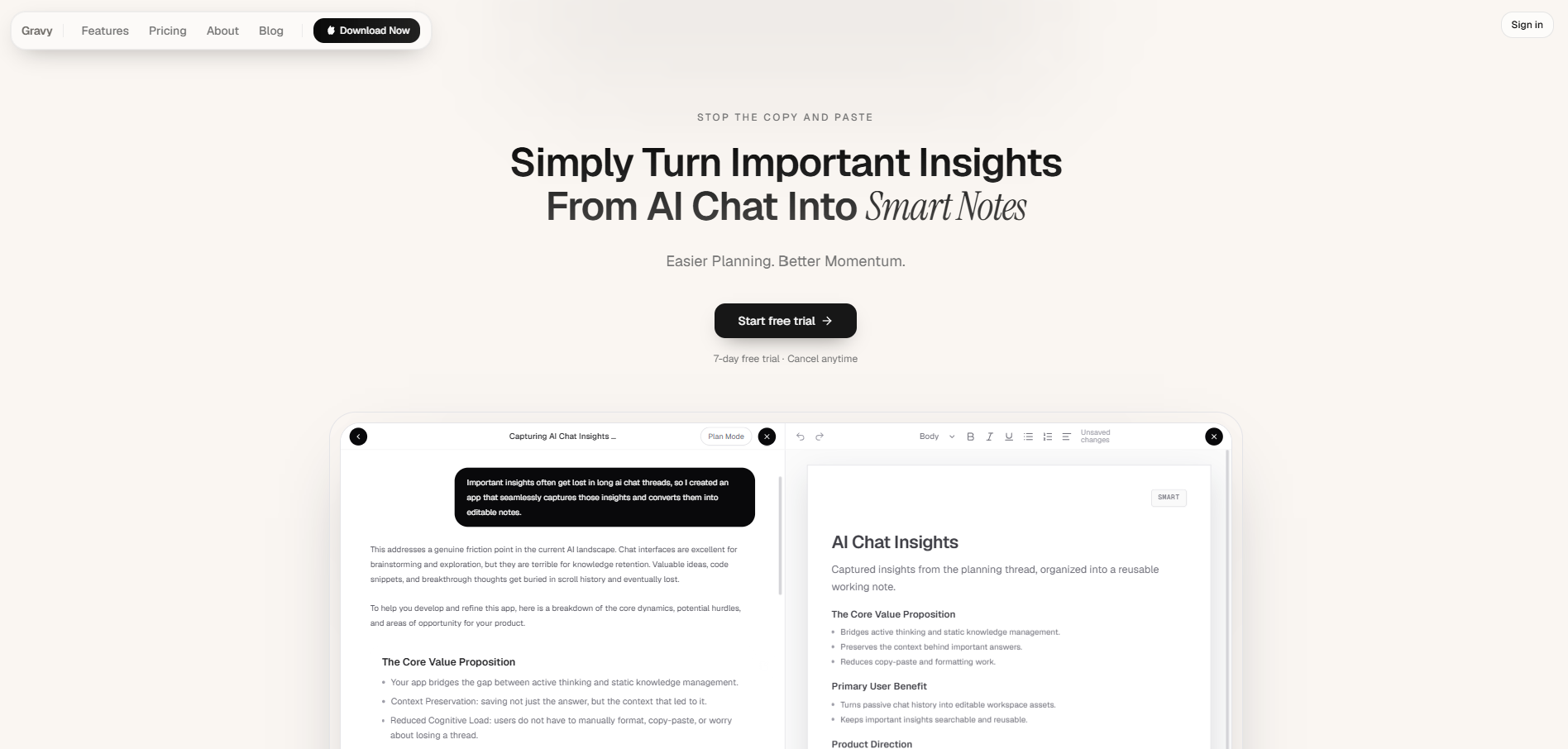
Gravy organizes AI chat insights differently because it does not treat the chat thread as the final storage system. The conversation is still there, but the useful parts can become structured notes at the moment they appear. That distinction is important. A normal chat history helps you remember that a conversation happened. An AI chat notebook helps you reuse what the conversation produced.
The workflow is built around three layers. First, you use Gravy Chat normally, asking questions, brainstorming, planning, and refining ideas without learning a special syntax. Second, AI responses are broken into Smart Blocks, so you can choose the specific section worth keeping instead of copying the whole response. Third, one click turns that Smart Block into an editable Smart Note.
That means the organization happens at the insight level, not just the thread level. Instead of having one giant conversation titled “business planning,” you can build a library of notes like “pricing assumptions,” “launch risks,” “customer avatar,” and “next feature ideas,” all created from the chat where the thinking began.
How to organize ChatGPT conversations
- Group chats by active workCreate groups around projects, decisions, recurring workflows, and reference material. Avoid broad folders that become junk drawers, such as “AI,” “business,” or “ideas.”
- Rename each chat by outcomeUse titles that describe what the chat produced. A title like “pricing test plan” is more useful than “ChatGPT pricing question” because it tells you why the conversation matters.
- Extract reusable answers into notesWhen a response contains a checklist, framework, plan, or decision, turn that part into a standalone note. Do not rely on the full thread as your only storage system.
- Add context to each saved insightWrite one sentence explaining the project, decision, or task the note supports. This helps your future self understand why the answer was worth saving.
- Review and clean up weeklyOnce a week, archive old chats, rename unclear ones, merge duplicate notes, and move the best AI insights into the project where they will actually be used.
How Gravy fits
Gravy fits this workflow because it organizes useful AI thinking at the note level, not just the chat level. You can chat normally, save the best Smart Blocks as editable Smart Notes, and build a searchable workspace from the ideas that would normally stay buried in a long thread.
FAQ
What is the best way to organize ChatGPT conversations?
The best way is to organize conversations by project, decision, recurring workflow, or reference topic. Then rename each chat based on the useful outcome it produced, not the first prompt you typed.
Should I use ChatGPT Projects to organize my chats?
ChatGPT Projects can help keep related chats, files, and instructions together. They are useful for grouping ongoing work, but important answers may still need to be extracted into notes if you want to reuse them easily.
How do I keep ChatGPT conversations from becoming messy?
Start each conversation with one clear purpose, rename it after the useful output, and save important answers as separate notes. Mess usually happens when too many unrelated ideas stay inside one long thread.
Is it better to save ChatGPT chats or save ChatGPT answers?
Save chats when you need the full context. Save individual answers when you need reusable material, such as frameworks, checklists, plans, summaries, or decisions. Most people need both, but for different reasons.
How can Gravy help me organize AI conversations?
Gravy helps by turning useful sections of AI responses into Smart Notes. Instead of relying only on chat history, you can capture the specific insight, edit it, and keep it organized in the same workspace.